Pages

Ads 468x60px

Showing posts with label Launcher. Show all posts

Tuesday, October 23, 2012

Dream Theme for CM9/CM10 1.2.5

Dream Theme for CM9/CM10 v1.2.5 Apk - WORKING WITH [XHDPI/HDPI]!

You can download the BLUE version here 
https://play.google.com/store/apps/details?id=com.dreamblue.theme.dreamblue&feature=search_result#?t=W251bGwsMSwxLDEsImNvbS5kcmVhbWJsdWUudGhlbWUuZHJlYW1ibHVlIl0.

Or simple type in search Dream Blue for AOKP/CM9 and you'' find it :)

This theme tasted only AOKP and normally it should work with CM9 too. Do not complain if you are on a different rom!

I want to say thank you to everyone that helped me finish this theme and although some parts are still need some theming i'll improve them with quick future updates here. :)

Dream Theme for CM9/CM10 1.2.5
$1.82

This is my very first theme so keep in mind that you may find some bugs or even some unthemed images but those are few. There is an Easter Egg in the theme (the clock widget has now a new more elegant look ;) ).

About the color of the theme i have to say that orange with dark gray is my favorite combination but i'll do some other color variations in the future too (blue, white, green, red etc).


Also this theme fits REALLY well whit MiHome Launcher.

Dream Theme for CM9/CM10 1.2.5

REQUIRES ANDROID:4.0 and up

Download Apk :

Market :
https://play.google.com/store/apps/details?id=com.dream.theme.dream

Thursday, October 18, 2012

Nova Launcher Prime 1.3.2

Nova Launcher Prime v1.3.2 Final Apk - Highly customizable, performance driven, home screen replacement for Android 4.0+

Accept no substitutes! Nova Launcher is the original and most polished customizable launcher for Android 4.

Features include:
Color Themes
Change the ascent color of the launcher, full color picker support

Icon Themes
Apply ADW or Go launcher icon themes to all app icons

Scrollable Dock (for Tablets and Phones)
Keep all your favorite apps on the dock, with up to 7 icons per page and up to 3 pages.

Customizable App Drawer:
Transparency
Scrolling style, choose between horizontal paginated or vertical continuous

Scroll Effects
Enjoy eye candy when scrolling your desktop and drawer. Effects include Cube and Cardstack and more for Prime users.

Infinite Scroll
Never be far from your favorite page, loop through your desktop continuously.

Folder Icons
You can chose a background, preview style or even replace the whole icon.

Nova Launcher Prime 1.3.2
Backup/Restore
Export your settings and layout before a wipe to quickly get back up and running.

Widgets in dock
Add any 1x1 widget to the dock

Widget Overlapping
Overlap on resize or placement, long-press to send to back or bring to front

Bulk Add
Add multiple apps to the desktop or a folder at once

Activities shortcut
Select hidden activities from your favorite apps

*Nova Launcher Prime Features (Paid version)*

Nova Launcher Prime unlocks the following features in Nova Launcher:

Drawer Groups:
Folders in App Drawer
Unlimited custom tabs
Organize apps into tabs and folders in the app drawer

Gestures
Quickly start Nova Actions or Apps from gestures on the desktop, such as pinching, swiping or two-finger swiping.

Hide Apps
Keep a clutter free drawer by hidding never used apps.

Dock Swipes
Get more use out of your dock apps by setting swipe-actions

Unread Counts
Never miss an email. Unread count badges for SMS, Missed calls, Gmail, Email, Google Voice and more. Counts show in the dock, desktop, drawer and folders.

More Scroll Effects

Permissions:
Access Widget Data: This is in order to display the widget and widget's data to you. This dialog/permission is new in Jellybean. The data is not used for anything aside from displaying it.
Internet/Network State/Wifi State: Optional & Anonymous error/usage reporting. Download of opt-in Beta updates.
Directly call phone numbers: Only used if you place a direct-dial shortcut on the homescreen.
Wallpaper/Vibrate/Status Bar/Choose Widgets: Standard Launcher functions
USB (SD) Storage: Backup/restore and beta updates.

Nova Launcher Prime 1.3.2

REQUIRES ANDROID:4.0 and up

Download Apk :
http://www.directmirror.com/files/0VDPMCCT
or
http://www.directmirror.com/files/1PIAALN4

Market :
https://play.google.com/store/apps/details?id=com.teslacoilsw.launcher
https://play.google.com/store/apps/details?id=com.teslacoilsw.launcher.prime

Friday, October 12, 2012

GO Launcher EX 3.17

GO Launcher EX v3.17 Apk - Extended version of GO Launcher, one of the most popular home application.

GO Launcher EX is the most popular Android home launcher replacement app in Google Play. It offers you many first-ever features to customize your own homescreen experience. Go launcher EX provides you speedy and smooth operation, fancy and plentiful themes, and utility functions with imagination.


Features:
- Extremely smooth transition animation
- Smooth flipping operation
- Thousands of personalized themes
- Amazing custom gestures feature offers you more convenience and fun
- Various GO widgets (weather, switcher, calendar…)
- Efficient and strong app management function, including sorting, hide app, search, cleaning memory and refresh.

New features:
- Squeezing effect of icons and widgets (Jelly Bean style)
- Sharing your homescreen layouts with your friends by choosing 1 or 3 screenshots.
- Drag and swinging icon upward to delete icon or widget.
- Vertical loop option for app drawer ( in app drawer settings)
- File browser supports build-in music player and picture browser.
- App drawer supports to hide files

GO Launcher EX 3.17

Tips
1. How to get themes, widgets and lockers?
a) Search ‘go launcher theme’, ‘go widget’ or ‘go locker’ in Android Market.
b) Use GO Store via menu button in GO Launcher.
2. How to set transition animation?
Use ‘Effects settings’ via button in GO Launcher.
3. Icons are too small?
Use ‘Icon Size’ option in ‘Preferences->Visual settings->Icons’ to make icons bigger.
3. Long press the app icon to enter editing mode on home screen and app drawer.
4. Glide up to open menu and glide down to pull down notification.
5. The widgets in the screenshots belong to GO Widget, attainable from Android Market or GO Store.
6. File browser can be found in the lower left of app drawer. 
7. Process management feature is found down the running tab of app drawer. Clicking the broom icon and clean the memory.

Important:
1. GO Launcher is a totally free app without any charge. 
2. If you cannot set ‘GO Launcher’ as the default home app, download ‘Home Manager’ to fix it. 
3. ‘DIRECTLY CALL PHONE NUMBERS’ permission?
It's required by the feature to create shortcuts of ‘person’ and ‘direct dial’. GO Launcher won't make unattended phone call and cost your money.
5. ‘READ CONTACT DATA’ permission?
It's required by the feature to create 'person' shortcut as well as to add contact folder.

Our commitments are respecting user privacy and delivering cool experience. Please help us by rating this app and recommending to the others.
Want an extreme makeover to your phone? Try it out!
Follow Us on
Owned by and Visit 3G.cn Through Your Mobile. 
Copyright 2004-2012 All Rights Reserved.

GO Launcher EX 3.17

REQUIRES ANDROID:2.0 and up

Download Apk :

Market :
https://play.google.com/store/apps/details?id=com.gau.go.launcherex

Thursday, October 11, 2012

Galaxy S3 Theme 2.3

Galaxy S3 Theme v2.3 APK - Checkout The Official Galaxy S III Launcher Theme. Available Now!

***Completely New Look and Feel***
***********ON SALE NOW************
This theme is the first of its kind and features All the High Res (96x96) Stock Icons from the Galaxy S3 as well as the Galaxy S2, Stock 720p HD Wallpapers and Extra (43) loaded in a standalone wallpaper applier, TouchWiz UX App Drawer Style and All apex images changed to S3 White color and even Folder Icon & BG's match the device as well.

*Compatible with APEX LAUNCHER and NOVA LAUNCHER*

--------------------------------
Applying Themes Using Launcher
--------------------------------
1.Open Launcher
2.Click the Theme of your choice "Apply Apex Theme" or Apply Nova Theme"
3.Click "Apply" for Apex and Click "OK" for Nova
------------------------------
Apply Using Apex Launcher
------------------------------
1.Download and install Apex Launcher
2.Hit Menu from home and click "Theme Settings"
3.Click "Look And Feel"
4.Click "Icon Theme"
5.Choose "Galaxy S3 Theme"
6.Press OK
------------------------------
Apply Using Nova Launcher
------------------------------
1.Please Use Launcher to Apply Theme

$1.50

--------------------------------------
**Best Look and Feel Recommendations**
--------------------------------------
1.Turn App Drawer transparency to 15-20 or so
This makes it look more like TouchWiz 5
2.Keep Stock Backgrounds (There are 5 GS3 Official wallpapers)
3.If GS3 Icon's don't show for your STOCK Apps (Email,Contacts, etc)
Press and hold the icon, Click "Edit", Click the Icon, press "Select from icon packs", choose "Galaxy S3 Theme" and find the icon needed.
4.Email me with any Feedback or Recommendations, I actually respond to emails and will update the app on good recommendations or BUG Fixes or If icons don't apply.

**Supports Languages** 
(English,German, Greek, English, Spanish, Italian, Portuguese, Russian)

"This Theme is new and updates will be regular to improve the theme and include more features, Feedback must be given if there are bug's or recommendations, Please email me @jaisonbrooks@gmail.com , Thanks"


REQUIRES ANDROID:4.0 and up

Download Apk :

Market :
https://play.google.com/store/apps/details?id=com.jaisonbrooks.apex.galaxys3

RealDepth Ice Cave LWP 1.0.1

RealDepth Ice Cave LWP v1.0.1 APK - Look around the cave using sensors! Realistic 3D ice cave on your home screen.

RealDepth Ice Cave Live Wallpaper: A beautiful ice cave scene with a cool 3D depth effect.
Not just a picture - this is a dynamic wallpaper. Look around by just moving your phone or tablet.
Amazing ice cave with different icicles hanging from the top with a breath taking depth feeling. Very high resolution, vibrant colors and day and night modes will give a great look to your home screen.

★ Less than 2% battery usage on average! ★

CUSTOMIZE:
★ Show and hide visual effects.
★ Use accelerometer to not just look around but also rotate the scene around its axis.
★ Change the speed, rate and smoothing of sensors and movement.
★ Add more icicles or hide them.
★ Switch between day and night modes.
★ Change the frame rate.

$1.35

TIPS:
★ Showing wind effect and more icicles reduces performance.
★ Select "Set to Low Settings" for smoother performance and even less battery consumption.
★ Compass calibration could be required if the wallpaper doesn't move well.

TO USE:
Home->Press Menu->Wallpapers->Live Wallpapers->RealDepth Ice Cave

* Works with devices with a compass and/or accelerometer sensors. Otherwise only home screen transitions will be used for animation.
* For devices that support live wallpapers.


REQUIRES ANDROID:2.1 and up

Download Apk :

Market :
https://play.google.com/store/apps/details?id=com.olegapps.cavelwp

BRUSHED METAL APEX-GO THEME 1.1

BRUSHED METAL APEX-GO THEME v1.1 APK - For all users on android 4.1.1 having a problem with icons not themed in apex-nova launchers
don't cancel your order just email me and ask for apk file , Because Android Jelly Bean 4.1.1 is causing issues with how themes are accessed by the launchers.

Brushed Metal Apex - Nova - Go Launcher Theme

Installation Apex Launcher :
- Install Apex Launcher (Free or Pro)
- Install theme
- Open Apex Settings
- Open Theme Settings
- Select and Apply Brushed Metal Theme

Installation GO Launcher :
- Please Do Not open directly after it's installed.
- Back to GO Launcher EX: MENU > theme preferences.
- Select and Apply Brushed Metal Theme

For icons requests please email me
Thanks for your support :)

$1.49

-----------------------------------------------


REQUIRES ANDROID:2.0 and up

Download Apk :

Market :
https://play.google.com/store/apps/details?id=com.gau.go.launcherex.theme.brushedmetal

Monday, October 8, 2012

Smart Launcher Pro 0.10.8

Smart Launcher Pro v0.10.8 Apk - Smart Launcher is an innovative launcher characterized by a minimalist design, low memory usage and an user-friendly UI that let you start any application with a few taps.
It is currently the only launcher on the store to features automatic cataloging of installed apps!

This is the first version :)

Features:
- Main screen with Quick Start
- Drawer organized by categories
- Ready to use without special configurations.
- Support for Live Wallpaper and screens of different sizes.
- Support of set of icons for Launcher Pro and ADW Launcher

Smart Launcher Pro 0.10.8
$2.32


------------------------------------------

Smart Launcher Pro 0.10.8

REQUIRES ANDROID:2.1 and up

Download Apk :

Market :
https://play.google.com/store/apps/details?id=ginlemon.flowerpro

Sunday, October 7, 2012

TSF Shell 1.7.5

TSF Shell v1.7.5 Apk - TSF Shell 3D is an interface with brand new operating system.
Enable you to freely personalize various widgets to a full range. Let’s say goodbye to the traditional operation system.

For more details of the release histroy and the demo of all versions please access to the following link

http://www.tsfui.com/shell/release_history.html

Features:
========================

Enable you to do multipul-operation, including auto-arragement, multipul-choices, add-to-folder, multipul-deleting, to the items by only one move of the finger. You can also check your folders in various ways.
TSF SHELL 3D has one app page and 4 personalized pages for our users. You can switch between pages by one click at the switch button in the lower left corner.
You can freely create one or more quicklinks for apps and drag them to any page. You can also distribute all the app icon (or even change their angles) freely in the personalized page.
The side column provides the most TSF Shell 3D charateristic widgets, including folders, contacts, music player, weather and so on.
The side column can be personalized as well, including changing the order and position of different catagories. You can create quicklinks of your most frequently used apps and contact in the quick launch in the side column.
TSF Shell 3D has a most powerful theme function. Apart from the difference in style, some themes even allow change in the transition animation.
TSF Shell 1.7.5
$16.81


Tips:
========================

1. The folder where the application is less than 8, only to circle the icon into the folder.
2. The folder where the application is more than 8, only to drag the icon ftom the folder.

========================

Currently we are still trying to improve our TSF Shell 3D. We will update our product and new widgets regularly. Please check for updates so that you can the best experience.
We also welcome any comments or suggestions for improvement of our product.

IMPORTANT
========================

Please rate the app if you like it. If you have any questions or comments, please email us at:
service@tsfui.com

Notic:The Unofficial version of TSF Shell V1.5.0 may result in black screen.

Keywords & Tags: TSF Shell,TSF 3D Screen,TSF 3D launcher,SPB,GO LAUNCHER,SPB shell,Launcher,3D UI,3D Launcher.


TSF Shell 1.7.5
 
 
Requires Android:2.1 and up 
 
Download Apk :

Market :
https://play.google.com/store/apps/details?id=com.tsf.shell

Launcher 7 – Donate 1.1.14.16

Launcher 7 – Donate v1.1.14.16 Apk _ Ad-free version of Launcher 7.

G+ page https://plus.google.com/113192992285762862111

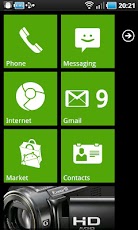
The Winphone 7 lookalike launcher, almost like the real thing and in some ways even better!

Features:
- 1x1, 2x1 and 1x2 tiles with configurable colors
- Widgets in a tile! (provided that widget fits)
- Almost real like tile animation
- Almost real like tile re-arrange mode
- Almost real like status bar
- Animated contacts tile (supports G+ synced contacts)
- Pinnable contact-tile which animates like the real phone
- Folder tiles
- Webpage tiles
- Picture hub (use with care, it needs memory!!!!)
- Filterable application list
- Stock wp7-like colors and color selection

FAQ:
- Full tile bitmaps are no more! Normal tiles can now have background image which does the same thing - and you can now have both icon and background on a tile!
- Real view widget tiles may cause jerky scrolling, framework is performing garbage collection at most inconvenient time, there is currently no known cure.. I haven't yet given up hope finding one though
- PICTURE HUB NEEDS A LOT OF MEMORY! IF YOU ENCOUNTER PROBLEMS, STOP USING THE TILE - THERE IS NO WAY TO MAKE MEMORY FOOTPRINT SMALLER, OR INCREASE MEMORY ON YOUR DEVICE
- To add new application to main screen, long press on an application in application drawer and select "pin to home screen"
- Tiles can be made transparent by adjusting the alpha value from the horizontal bar on the color selector
- By default WP7 statusbar shows icons only if you touch it. You can adjust the functionality from statusbar options
- "Smaller tiles" will make 1x1 tile to 172x172 pixels in HDPI resolution. I managed to measure the tiles wrong when I started developing L7 and tiles have been too big ever since. 172x172 tiles seem to be faster too, so I suggest you to try them!

$1.94

TODO-list:
- folder of contacts tile
- revamp the application icon addition (allow text color selection etc)
- App integration (Twitter, Facebook etc.)
- two-sided tiles
- cropping tool to make custom bitmap selection easier

Changelog

Version 1.1.13
- separate widget screen added, L7 settings -> widget view access lets you define how to get to the screen
- mail tile has new "cube" option
- some tweaks for ICS added

Version 1.1.12
- contacts tile now flips instead of fading
- .12.3: L7 is now launchable like ordinary application

Version 1.1.11
- backup and restore updated, now it should work again
- backup format changed, old backups no longer work (but then again they didn't work anyway, so nothing is lost)
- search button can be removed (L7 settings->application drawer->hide search button)
- search view now displays wallpaper
- updating cache displays progress bar
- android style drawer now follows transparent icons setting

Version 1.1.10
- credits-page now has Google+ button which takes you to a place where you can follow the L7 development
- search-button has been added to app drawer
- inconsistent spacing between app drawer icons fixed
- mail tile crash fixed
- calendar tile text can now be changed
- calendar tile will not start with transparent background when created

Permissions:
android.permission.READ_SMS - SMS tile
READ_CONTACTS - contacts tile
INTERNET - ads <3
GET_ACCOUNTS - calendar tile
READ_GMAIL - gmail tile (2.2+2.1)
READ_CALENDAR - calendar tile
WRITE_EXTERNAL_STORAGE - backup/restore
CHANGE_NETWORK_STATE - statusbar
READ_PHONE_STATE - statusbar
ACCESS_NETWORK_STATE - statusbar
ACCESS_WIFI_STATE - statusbar
EXPAND_STATUS_BAR -statusbar.


Requires Android:2.1 and up

Download Apk :
Launcher 7 – Donate 1.1.14.16 - Mediafire

Market :
https://play.google.com/store/apps/details?id=info.tikusoft.launcher7

Friday, October 5, 2012

GLASS APEX-NOVA-GO THEME 1.1

GLASS APEX-NOVA-GO THEME v1.1 Apk - Glass Apex - Nova - Go Launcher Theme

Installation Apex Launcher :
- Install Apex Launcher (Free or Pro)
- Install theme
- Open Apex Settings
- Open Theme Settings
- Select and Apply Glass Theme

Installation GO Launcher :
- Please Do Not open directly after it's installed.
- Back to GO Launcher EX: MENU > theme preferences.
- Select and Apply Glass Theme

For icons requests please email me
Thanks for your support :)
GLASS APEX-NOVA-GO THEME 1.1
$1.49
---------------------------------------------------------------------------


GLASS APEX-NOVA-GO THEME 1.1
Requires Android:2.0 and up 
Download Apk :

Market :
https://play.google.com/store/apps/details?id=com.gau.go.launcherex.theme.droidglass

Wednesday, September 26, 2012

Fake iPhone 5 1.3

Fake iPhone 5 v1.3 Apk - The Ultimate iOS Style Launcher for Android.

Here is the launcher you've been waiting for. From the author of "Fake iPhone 4S" this brand new and improved version features all the visual styles of iOS 6.

Trick your friends into thinking you have the new iPhone 5! This app is a full-screen working replica of the iPhone home screen. All your apps are easily accessible - just flip the screen across to view more pages.

Works best on the Samsung Galaxy S II, Galaxy S3, Galaxy Nexus or any Android phone with a Super AMOLED+ display. Also runs on the latest Android 4.0 (Ice Cream Sandwich) & 4.1 (Jelly Bean) devices.

--Features--
* Most realistic iPhone skin on the market.
* Fully functional home screen replacement.
* Beautiful icon effects - all installed apps are styled.
* Comes with 16 default apps on the first page.
* Custom wallpapers supported!
* Swipe-to-Search available - just swipe left at the main screen.

--Frequently Asked Questions--
Q. Is this just a screenshot of the iPhone, like other apps?
A. No, this is a full working home screen replacement. When you press the Home button, you’ll be taken straight back to this app. No more TouchWiz or HTC Sense! ;)

Fake iPhone 5 1.3

Q. How do I switch back to my normal home screen?
A. Press the "Menu" key on your phone, select "Advanced" and hit "Switch Launcher..."

Q. Can I set my own wallpaper?
A. Yes, you certainly can! Just press “Menu” and then “Choose Wallpaper...”

Q. Are there any ads?
A. Yes. Advertising revenue helps support the future development of this app, so please bear this in mind :)

Whenever you click an icon which fails to load for some reason (the app isn't installed on your phone, or Android encountered an error) an ad will be displayed instead. The ads are design to be non-intrusive and relevant. Generally you'll be offered a list of related apps which you might be interested in.

Q. How is this different to Espier Launcher?
A. Fake iPhone 5 is designed to be the most realistic iOS skin on the market. Espier supports a few more features, but doesn't look so good if you place it side-by-side with a real iPhone. We've focussed on making a photo-realistic app to start with, and will be adding more features in future updates.

---Feedback---
I'm open to ideas, so let me know if you have any suggested features or improvements. Either leave a comment, or shoot me an email at thebigbyte@gmail.com

Every email is read, and you will get a reply.

--Privacy--
This app collects anonymous usage information via Google Analytics, and automatic error reports using ACRA. But rest assured, we don't store any personally identifiable information. We don't know what brand of toothpaste you use!

An example of some of the stuff we keep track of:
* Number of daily users
* Aggregate information about apps (including popular apps launched)
* Frequently used menu items

Collecting this data helps us continuously improve the app. If you're concerned about what might be collected, or have any questions please get in touch at thebigbyte@gmail.com

---Permissions---
This app uses several external libraries, including Google Analytics, ACRA, LeadBolt and other ad networks. Some of these libraries require additional permissions.

* SET_WALLPAPER and SET_WALLPAPER_HINTS are necessary to set & retrieve the home screen wallpaper
* INTERNET_ACCESS, ACCESS_NETWORK_STATE and ACCESS_WIFI_STATE are required for Google Analytics, ACRA and advertising networks.
* READ_PHONE_STATE, WAKE_LOCK and RECEIVE_BOOT_COMPLETED are required for advertising networks (currently interstitials, and push notifications may be enabled in future)
* WRITE_EXTERNAL_STORAGE is required to cache error reports before transmission, and for rich media ads

---Trademarks---
iPhone is a trademark of Apple Computer Inc. This app is not affiliated with or endorsed by Apple.

Fake iPhone 5 1.3

REQUIRES ANDROID:2.1 and up

Download Apk :

Market :
https://play.google.com/store/apps/details?id=com.bb.iphone5

Monday, September 24, 2012

Minimal MIUI Go Apex Theme 2.3

Minimal MIUI Go Apex Theme V2.3 Apk - This is a Minimal MIUI theme for GO Launcher EX. Also fully compatible with Apex Launcher, Nova Launcher & others.

*JELLY BEAN USERS! ANY THEME ISSUES? JUST EMAIL ME & I'LL FIX IT! IT'S A GOOGLE PLAY ISSUE*

This theme contains 370+ icons & counting! & it also contains the 4 wallpapers seen in the screenshots.

I take icon requests so please feel free to email me or leave a comment suggesting which app icons you'd like to see themed & I'll make it =)

Note: For Go Launcher, the icons are set to large in the screenshots. You can easily do this by: menu > preferences > visual settings > icons > icon size > large size.

This is NOT a standalone app, you need a launcher such as Go, Apex, Nova, etc that allow custom themes.

Minimal MIUI Go Apex Theme 2.3
$1.29

Installation
1. Install Go Launcher, Apex, or Nova (all free in the Play Store)
2. Install this theme
3. Find Minimal MIUI in any of the launcher's theme settings, then apply.

If you have any questions/comments/concerns/ideas then please email me atkantbstopped519@gmail.com

& don't forget to rate 5 stars if you like it! Thanks!

golauncher ex golauncherex theme minimal miui apex nova ui 3.0 theme atom store launcher windows 8
Minimal MIUI Go Apex Theme 2.3

REQUIRES ANDROID:2.2 and up

Download Apk :

Market :
https://play.google.com/store/apps/details?id=com.go.launcherex.theme.kxnt.miui

Wednesday, September 19, 2012

Chameleon Launcher for Tablets 1.0.0

Chameleon Launcher for Tablets v1.0.0 APK - Chameleon is a revolutionary tablet-specific launcher that lets you create multiple home screens, each with your own layout of widgets and apps. The Chameleon system includes an innovative context based home screen system giving you the most relevant information that you want, when you want it.


The Next Generation of Widgets.

Android widgets are not all created equally - and that's the problem - so we decided to raise the bar. The result is widgets that look beautiful together and are as easy to layout as drawing on a screen. Take a look at some of our other widgets or build your own with our custom API.

-Calendar
-Clock
-Facebook
-Google+
-Instagram
-Media Player (Coming soon)
-RSS News Reader
-Switches
-Twitter
-YouTube
Chameleon Launcher for Tablets 1.0.0
$10.25


Home Screens that Change With You

Your information needs may change throughout your day, so Chameleon includes an innovative context system. You can create context rules based on GPS locations, WiFi networks and time ranges, allowing you to define which Home Screen is the most relevant for any situation.


App Tray & Launcher

Chameleon doesn't just let you customize your Home Screens with the widgets you want. It also lets you customize your own mini App Tray. Giving you the apps you want up front, without having to swim through a large grid of apps.


Super Easy To Customize

Quickly set up Home Screens, Widgets, App Trays, and Wallpapers all with a few gestures.


Chameleon. Always relevant. Immediately valuable.
Chameleon Launcher for Tablets 1.0.0

REQUIRES ANDROID:3.2 and up

Download Apk :

Market :
https://play.google.com/store/apps/details?id=com.chameleonlauncher

Thursday, September 6, 2012

ssLauncher the Original 1.7.12

ssLauncher the Original v1.7.12 Apk - The fastest and fully customizable!

'ssLauncher the Original' is implementing all features of ssLauncher(free version). Additionally, this includes more features, some of which are applied partially to the free version.


* Features

- all of ssLauncher
- no ads
- copy & paste of shortcuts
- crop icons and images
- additional formatted text
- additional page transition animations
- supports application parcel(folder) without limitation
ssLauncher the Original v1.7.12 Apk
$3.17


ssLauncher the Original v1.7.12 Apk

REQUIRES ANDROID:2.2 and up

Download Apk launcher :

Market :
https://play.google.com/store/apps/details?id=com.ss.launcher.to

Thursday, August 16, 2012

Pure HD Apex Theme 3.0

Pure HD Apex Theme 3.0 - Pure High Definition Apex/Nova Theme by Photox Designs for Apex Launcher - Full HD Icons and 14 Wallpapers.Beautiful icons and unique design of icon will make any application look like a default icon that will give your whole phone a consistent elegant look. Get it and have a completely new makeover of your smartphone.

===>Important tips:

Open Pure HD Apex/Nova Theme after installation and apply Apex Theme if you are using Apex Launcher or Apply Nova Theme if you are using Nova Launcher.

Thank you for downloading our theme. Don't hesitate to email us if you have any problems, questions or suggestions. If you like the theme, please leave a positive review.
Pure HD Apex Theme 3.0
$2.03

Photox Design’s Themes will be regularly updated to ensure that all the Apex/Nova themes are compatible with latest version of Apex Launcher. We will add features like more icons, wallpapers, etc. If you like this theme, check out our other Apex and Nova themes. Click on "More by Photox Designs"


Pure HD Apex Theme 3.0

Pure HD Apex Theme 3.0


REQUIRES ANDROID:4.0 and up

Download Launcher / themes :

Market :
https://play.google.com/store/apps/details?id=com.photox.purehd

Monday, August 13, 2012

Galaxy S3 Apex Theme 1.4

Check out the Official Galaxy S III Apex Launcher Theme. Available Now!

Check out the Official Galaxy S III Apex Launcher Theme. This theme is the first of its kind and features High Res (96x96) Stock Icons from the S3, Stock 720p HD Wallpapers (6) loaded in a standalone wallpaper applier, TouchWiz UX App Drawer Style and All apex images changed to S3 White color and More (Folder Icon & BG's, Extra Icons in Pack, and More Icons coming on update 1.6)

"This Theme is new and updates will be regular to improve the theme and include more, Feedback must be given if there is bug or recommendation @ jaisonbrooks@gmail.com , Thanks"
$1.99

**How to Apply**
------------------------------
1.Download and install Apex Launcher
2.Hit Menu from home and click "Theme Settings"
3.Click "Galaxy S3 Apex Theme"
4.Click "Apply"

**Best Look and Feel Recommendations**
------------------------------
1.Turn App Drawer transparency to 15-20 or so, This makes it look more like TouchWiz 5
2.Keep Stock Backgrounds (There are only 5 GS3 Official wallpapers)
3.If GS3 Icon's don't show for your STOCK Apps (Email,Contact, etc)
Press and hold the icon, Click "Edit", Click the Icon, press "Select from icon packs", choose "Galaxy S3 Apex Theme" and find the icon needed.
4.Email me with any Feedback or Recommendations, I actually respond to emails and will update the app on good recommendations or BUG Fixes.

If you experience a problem/request please prior to rating the application or uninstalling, please email me and i will resolve the issue per your request. I will respond to your email and update or fix the issue.
(See Below for Email)


REQUIRES ANDROID:4.0 and up

Download Launcher/themes :

Market :
https://play.google.com/store/apps/details?id=com.jaisonbrooks.apex.galaxys3

Friday, August 10, 2012

Atom Launcher v1.1

Atom Launcher v1.1 - Light and Easy!!
Atom Theme & Atom Store Grand Open!!
Atom Launcher, state of the art launcher for Android’s new OS; ICS, is now on market
5 Million download, SSKIN - now introduce you our new launcher for ICS
Experience new optimized ICS launcher if you have ICS version android phone

*** Features
- High quality : Launcher for Ice Cream Sandwich (from Android ICS 4.0.2) 
- Light & Easy : Offers Select Options by light and easy launcher 
- Stylish : Stylish UI with backgrounds, icons, and points colors 
- Smart : Optimized themes for ICS, Automatically supporting existing launcher such as SSKIN and Go Launcher 
- Fun: Offers fun-interactive themes by various backgrounds, live backgrounds and ICS’s widgets

*** Atom Launcher Spec. 
- Supports for ICS’s widgets and menu: Widgets located on upper side of screen (search bar or clock) 
- Available for Changing Display Settings on Hidden Dock: Emotional Filter Effect, Various Screen Switching, Opacity Adjustment
- Available for Changes by Setting Point Color Changes: Available for Color Changes for widgets, Menu, Guide, or icons 
- Live Background: Changes to dull backgrounds with dynamic backgrounds
- Wide-Range Theme Support: Wide-range theme support by Atom Launcher and also existing SSKIN and GO Launcher themes

*** Attention
- Available from above Android OS 4.0.2 version
- The application needs 10 MB in total to save theme resources. 
- Because of enhancing usability, installed theme doesn’t appear
- Not Available for Tab Device (X-large screen)
- Badge: Display missed call, unread message (Supprots only defalt apps on your Android device, Could not support the funtion by devices)
Atom Launcher v1.1
FREE

*** Upgrade Info

+ What's new in version 1.0.0
Updates
- fixed exception error
- fixed malfunctions on All Apps edit mode
- changed setting list
- fixed disppearing error for Wokspace icons

Additional Functions
- Flipping display
- Possible to change icons indivisually
- Possible to chane app name
- Link to Atom store

+ What's new in version 1.1.0
Updates 
-upgrade the function bringing Home screen setting from defalt setting
-improved All Apps grid mode
-Fixed text errors on Atom menu
-Fixed error in moving items on Workspace

Additional Funtions
- Add All Apps Grid mode on lancher setting
- Add scroll-funtion for folder icon and folder guide 
*** Customer Support
Please leave reviews or comments on Google play reviews
Your review will be appreciated.

For more information or support, please visit 


Atom Launcher v1.1

Atom Launcher v1.1


REQUIRES ANDROID:4.0 and up

Download Launcher :

Market :
https://play.google.com/store/apps/details?id=com.dlto.atom.launcher

Tuesday, August 7, 2012

ssLauncher the Original 1.7.2 Apk

ssLauncher the Original 1.7.2 Apk - Android-9. The fastest and fully customizable!

'ssLauncher the Original' is implementing all features of ssLauncher(free version). Additionally, this includes more features, some of which are applied partially to the free version.

* Features

- all of ssLauncher
- no ads
- copy & paste of shortcuts
- crop icons and images
- additional formatted text
- additional page transition animations
- supports application parcel(folder) without limitation
ssLauncher the Original 1.7.2 Apk
$3.19


REQUIRES ANDROID:2.2 and up

Download Apk :

Market :

Sunday, August 5, 2012

Go Launcher Jelly Bean Theme 1.2 Apk

Go Launcher Jelly Bean Theme 1.2 Apk - Android-9. This is a Jelly Bean & Ice Cream Sandwich Minimal theme for GO Launcher EX, inspired by Android 4.0 & 4.1, along with Google's UI.

This theme contains 115+ icons & counting! It also contains the 8 wallpapers seen in the screenshots.

I take icon & wallpaper requests so please feel free to email me or leave a comment suggesting which app icons you'd like to see themed & I'll try to make it =)

This is NOT a standalone app, so download Go Launcher EX in the market if you haven't already done so.
$0.99

Installation
1. Install GO Launcher EX (free & available in the Market)
2. Install this theme
3. Menu -> Themes -> ICS Jelly Bean

If you have any questions/comments/concerns/ideas then please email me atkantbstopped519@gmail.com

& don't forget to rate 5 stars if you like it! Thanks!

golauncher golauncherex theme ice cream sandwich minimal ics jb jelly bean


REQUIRES ANDROID:2.2 and up

Download Apk :

Market :

Sunday, July 29, 2012

RAZR HD Apex / Go Launcher EX 1.4 Apk

RAZR HD Apex / Go Launcher EX 1.4 Apk
$0.99
RAZR HD Apex / Go Launcher EX 1.4 Apk - Android-9. Droid style theme is available now! For GO Launcher EX. Original icons, wallpapers, folder interface and app drawer.

Features:
- Special icons(200+)
- 26 HD Wallpapers
- 5 dockbars
- Special app drawer skin
- folder interface
- app2sd

This theme will not open on its own, you must install the free home screen app "GO Launcher EX" and apply it.

How to install;
1. Make sure the latest version of GO Launcher EX has been installed (Search “GO Launcher Ex” to download)
2. Apply the Theme: MENU->Themes->Choose Razr theme.

Droid Razr, Galaxy Nexus, razr maxx supported, razr apex, droid apex.


REQUIRES ANDROID:2.0 and up

Download :

Market :
Related Posts Plugin for WordPress, Blogger...