Pages

Ads 468x60px

Showing posts with label Applications. Show all posts

Sunday, November 4, 2012

Moon+ Reader Pro 1.8.5b

Moon+ Reader Pro v1.8.5b Apk - Your finger ebook reader with fantastic reading experience.

Professional book reader with powerful controls & full functions.

*Support online ebook libraries and personal calibre ebook server.

*Read local books with smooth scroll and tons of innovation.

Support txt, html, epub, pdf, mobi, umd, fb2, chm, cbr, cbz, rar, zip or OPDS; key features:

-

• Full visual options: line space, font scale, bold, italic, shadow, alpha colors, fading edge etc.

• 10+ themes embedded, includes Day & Night mode switcher.

• Various types of paging: touch screen, volume keys or even camera, search or back keys.

• 24 customized operations (screen click, swipe gesture, hardware keys), apply to 15 customized events: search, bookmark, themes, navigation, font size and more.

• 5 auto-scroll modes: rolling blind mode; by pixel, by line or by page. Real-time speed control.

• Adjust the brightness by sliding your finger along the left edge of the screen, gesture commands supported.

• Intelligent paragraph; indent paragraph; trim unwanted blank spaces and lines options.

• “Keep your eyes health” options for long-time reading.

Moon+ Reader Pro 1.8.5b
$4.79

• Real page turning effect with customized speed/color/transparent; 5 page flip animations.

• My Bookshelf design: Favorites, Downloads, Authors, Tags; self bookcover, search, import supported.

• Justified text alignment, hyphenation mode supported.

• Dual page mode for landscape screen.

• Support all four screen orientations.

• Backup/Restore options to cloud via DropBox, sync reading positions between phones and tablets.

• Highlight, Annotation, Dictionary (Offline or Online, support ColorDict, GoldenDict, Fora, ABBYY Lingvo, etc.), Translation, Share functions all in moon+ ebook reader.

• Localized in 40 languages: English, አማርኛ, العربية, հայերեն, Български, català, český, dansk, Nederlands, eesti, suomi, français, galego, საქართველოს, Deutsch, ελληνικά, עברית, magyar, Indonesia, italiano, 日本の, 한국의, македонски, persan, polski, português, português brasil, român, русский, српски, 简体中文, slovenských, slovenskega, español, Svenskt, 繁體中文, ภาษาไทย, Türk, Український, Việt

-

Additional benefits in pro version:

✔ Ad-free
✔ Shake the phone to speak (Text-to-speech, TTS engine support)
✔ More beautiful themes, background images and fonts
✔ Reading statistics function
✔ PDF support, fast & speech compatible
✔ Customize reader bar function
✔ Headset & Bluetooth keys control
✔ Multi-point touch support
✔ Option for password protection at startup
✔ Book to home screen shortcut
✔ Annotations, highlights & bookmarks share support
✔ Customer email support

-

PDF features in Pro version:
✔ Fill out PDF Form
✔ Highlight, annotation, handwriting
✔ Smart scroll lock, smooth reading experience
✔ Night mode support, 6 additional pdf themes available
✔ Dual-page mode for landscape screen
✔ Speech, auto-scroll compatible 
✔ Read statistics, sync, flip animation available

Moon+ Reader Pro 1.8.5b

REQUIRES ANDROID:2.2 and up


Market :
https://play.google.com/store/apps/details?id=com.flyersoft.moonreaderp

Friday, November 2, 2012

App 2 SD Pro (move apps to SD) 2.61

App 2 SD Pro (move apps to SD) 2.61
$1.99
App 2 SD Pro (move apps to SD) v2.61 Apk - App 2 SD helps you to get more free internal phone storage space

Are you running out of application storage?

Do you hate having to check each and every app if it supports moving to the SD card?

Do you want an app that automatically does this for you and can notify you when an app can be moved?

App 2 SD streamlines the movement of applications to on your device's external or internal storage through your device's Settings. With this handy app, you'll have more control over your ever expanding collection of apps. This app is crucial to anyone who has memory management issues.

*** Over 12,000,000 Downloads! ***

★ View all SD card capable apps and move them seamlessly
★ notify if movable apps installed
★ 1-tap to clear all app cache
★ export the app list to SD card
★ install apps from the exported app list
★ home screen widget shows cache and available size
★ show app cache/data/code/total size
★ keep track of total and available storage space
★ sort through apps stored on phone and SD card
★ add movable apps to the ignore list
★ move apps back to the internal storage
★ view app on Market
★ quick uninstall apps by drag-n-drop
★ open app
★ show app details page
★ support "Move2SD Enabler"
★ customizable notification sound, vibrate and light


Reviews:
http://goo.gl/3hW3l

Same functionalities as "App 2 SD Free" app, but Ad removed.

This app is not used to backup apps to SD card. It only helps you to move a portion of apps used space to SD card. You have to manually install the apps after switching to a new phone or hard reset.

If app uses any of the following features, it cannot be installed on the external storage. It's required by Android system.
App Widgets,
Services,
Input Method Engines,
Live Wallpapers,
Live Folders,
Alarm Services,
Account Managers,
Sync Adapters,
Device Administrators

App shortcuts will disappear from the home screen after you move apps to the SD card. It's the limitation of Android system.

Failed to download apps or update them? It's Android Market's problem, please read the FAQ section from http://goo.gl/qvPcA for more details.

You have to install this app on the phone storage if you want to use the widget function. It's required by Android.

Some devices don't support the function of moving apps to SD card. Please download the FREE version to test if it works on your device before purchasing.

We have been selected as a Google I/O 2011 Developer Sandbox partner, for its innovative design and advanced technology.

Not supported devices:
* Galaxy S3, Note 2, Galaxy Nexus, Tablets
* read FAQ 10 for details: App 2 SD > MENU > Settings > About > FAQ

KW: app2sd, app to sd, a2sd

Credits:
Arabic-Mohamed Hany
Bulgarian-Димитър Димитров
Croatian-Bruno Švorinić
Danish-Christian Stangegaard Kappelgaard
Dutch-Niko Strijbol
French-Jérémy Roth (JeremX)
Finnish-Teemu Paavola
German-Wolfgang Dinter
Greek-George Georgiadis
Hebrow-Benjo26
Hindi-AzamAli
Hungarian-RootRulez
Italian-Luca Trevisan
Japanese-nnnnn
Macedonian-Петар Пехчевски
Polish-Kamil Szymański
Portuguese Brazilian-Altieres Lima da Silva
Romanian-Stelian Balinca
Russian-Павел Алексеев
Slovak-Patrik Žec
Spanish-Lahiri López
Swedish-Henrik Andersson
Turkish-Kutay KuFTi
Vietnamese-Phong Quang PdaViet

App 2 SD Pro (move apps to SD) 2.61

REQUIRES ANDROID:2.2 and up

Download apk :

Market :
https://play.google.com/store/apps/details?id=com.a0soft.gphone.app2sd.pro

Profile Scheduler+ 2.1.2

Profile Scheduler+ v2.1.2 Apk - The only profile manager you need. Simply set and forget.

*******************************************************
After months of testing and trying, it's confirmed that whitelist feature may not work on some phone. This is because some phones do not allow volume to be changed dynamically after a call/sms is received.

Please refer to the FAQ for more info:
*******************************************************

Profile Scheduler lets you change volume, wireless and other phone settings quickly and easily.

Simply set and forget!

Full features and without ads:
- unlimited rules
- up to 50 whitelist contacts
- widget to change profile, activate countdown timer
- profile shortcut

Users are encouraged to try out the free version before purchase!

Follow us on Twitter @wetpalm4android.

Activate profile by just a click or by rules : Scheduler, Location(GPS or Network [cells, Wifi, cell-id]), Calendar, Headset, Car Dock, Power, Battery Level, Wifi, Bluetooth, Orientation, Periodic Timer, or a countdown timer! You can even set the priority for the rules.

Lots of features, flexible and most importantly it's very simple to configure and use.

We (just myself) have been trying very hard to improve this app and your support is very important. If you like the app, please help me share it with your friends. Please do not ask question in your reviews as Google doesn't allow developer to respond to user reviews. If you encountered any problem, kindly check the online FAQ or contact me before leaving any bad comments. Thank you for your support and understanding.

Profile Scheduler+ 2.1.2
$3.26

For bug report, please refer to:

For suggestion, please refer to:

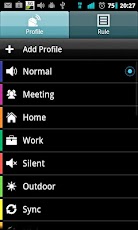
Profile Scheduler allows you to edit and create profiles and activate them the way you like. You will no longer need to change back to normal volume level manually after a meeting or a movie.

5 default profiles are available: Normal, Meeting, Silent, Night and Outdoor. If you don’t like them, simply change them or create your own. You may consider the following profiles:

Car – GPS on, Bluetooth on, Wi-Fi off, screen never timeout.
Power Saver – Mobile data, WiFi, GPS and Bluetooth off, low brightness, short screen timeout, auto-sync off

The following profile settings are supported:

- Volume for ringtone, notification, alarm, media, voice and system
- Vibrate for incoming call and notification
- Phone Ringtone
- Notification Ringtone
- Airplane mode
- Mobile Data
- Wi-Fi
- Bluetooth
- GPS (May not work on some phones due to Google blocking it)
- Speaker Mode
- Haptic Feedback
- Audible touch tone
- Brightness - Automatic, Default or Custom
- Screen timeout - 30 seconds, 1 minute, 2 minutes, 5 minutes, 10 minutes, 30 minutes, Never
- Auto-sync
- Wallpaper from Gallery or File Manager.
- Launch application
- Support 'Volume Locker'

Cool features
=============
- Rule prioritization
- Whitelist contacts: customise ringer/sms volume for certain contacts regardless of profile. Can be used as blacklist. (Known issue: unable to suppress vibration)

Options
=======
- Backup & Restore user data
- Option for to disable scheduler/rule
- Rule prioritization
- 2 color themes
- 12/24 hours display
- Countdown timer

Translation credits to:
- Jan (Dutch)
- Petr (Czech and Slovak)
- Elijah, Francois (French)
- Alexandr (Russian)
- Robert (German)
- Pedro (Spanish)
- Leo Yang (Taiwanese Chinese)
- Abu Iyad (Arabic)

Profile Scheduler+ 2.1.2

REQUIRES ANDROID:2.2 and up

Download apk :

Market :
https://play.google.com/store/apps/details?id=com.wetpalm.ProfileSchedulerPlus

Remote Desktop Client 3.7.0

Remote Desktop Client v3.7.0 Apk - No lugging your laptop around anymore. Connect remotely from an Android device.

*** Now with Windows 8 Multi-Touch Remoting Support ***

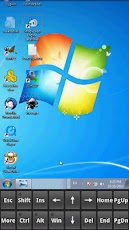
Xtralogic Remote Desktop Client for Android enables you to connect to your Windows computers across the Internet from a mobile device powered by Google Android platform. Once connected, it gives you mouse and keyboard control over your computer while showing you everything that's happening on the screen. You can leave your computer without losing access to your files, applications, and e-mail. Xtralogic Remote Desktop Client is using Microsoft Remote Desktop Protocol (RDP). All the necessary server components are already part of most versions of the Windows operating system (except Home varieties).

Features
* Support for Windows 8 Multi-Touch remoting (a.k.a. Metro)
* Simple Connect (eliminates the need for configuring port forwarding on a network router)
* Custom screen resolutions, including an option to automatically fit to the device screen
* Secure network communication protected by SSL/TLS
* Network Level Authentication (NLA) with CredSSP
* Microsoft Remote Desktop Gateway(RD Gateway) support
* RemoteApp programs support
* On-screen keyboard for keys missing on the device (functional keys, etc.)
* Server address book
* Master password to secure server password storage
* Audio redirection to the client from a remote computer
* Microphone redirection from the client to a remote computer
* File transfer between SD card and remote computer
* Copy/paste text between client and server
* Display zoom in/zoom out
* Pinch-to-zoom
* The first and only mobile Remote Desktop client with support for Microsoft Remote Assistance
* RDP data compression and caching to save bandwidth
* Android home screen shortcuts
* Support for x86 based Android devices
* Automatic activation of a software keyboard in text fields
* Support for international keyboard layouts
* Support for multitasking: switch to other apps without disconnecting
* Support for a physical keyboard (a keyboard connected over Bluetooth or USB)
* Physical mouse support: drag and drop with a single mouse click, mouse wheel, all three mouse buttons are supported (some features require Ice Cream Sandwich)
* Export/import the server address book and app settings to/from SD card
* Support for importing server settings from .rdp and XML files
* Multi-touch gestures for scrolling, mouse buttons emulation

Remote Desktop Client 3.7.0
$14.95

The following operating system have Remote Desktop Services and can be connected using Xtralogic Remote Desktop Client without any additional server side software:

* Windows Server 2000
* Windows XP Professional
* Windows XP Media Center Edition
* Windows Server 2003
* Windows Vista Business, Ultimate and Enterprise
* Windows Server 2008
* Windows 7 Professional, Ultimate and Enterprise
* Windows Server 2008R2

The following operating system do not have Remote Desktop Services out of the box:

* Windows XP Home
* Windows Vista Home
* Windows Vista Home Premium
* Windows 7 Starter
* Windows 7 Home Premium
* Mac OS
* Linux

Remote Desktop Client 3.7.0

REQUIRES ANDROID:Varies with device

Download Apk :

Market :
https://play.google.com/store/apps/details?id=com.xtralogic.android.rdpclient

Sunday, October 28, 2012

Uber Iris PRO - Photo Filters 1.1.0

Uber Iris PRO - Photo Filters v1.1.0 Apk - Stunning Photo Effects & Filter Editor that turn your photos from drab to fab!

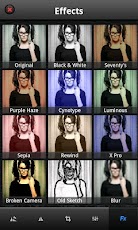
Apply awesome photo effects and 50+ filters to your photos with Uber Iris for Android! Convert your device into a pro photo studio by applying more than 50 different photo filters and effects to your photos!

Uber Iris is a photo editor for Android that lets you effortlessly add gorgeous and funky Instagram-like effects and filters to your photos. Pick from a wide range of filters, effects and other adjustments, apply them to your photos and watch them transform into uber cool works of art. And what’s more, you can also proudly display them on your Facebook, Twitter and Flickr pages!

This photo editor includes:

★ Extremely smooth and user-friendly interface which allows for quick photo editing.
★ Take a photo from within the app or import photos from your camera roll and edit them on the move. Go crazy with your camera!
★ Choose from over 50 awesome Instagram-like effects and filters to make your photos look artistic and stunning
★ Sliders to finely control each effect/filter and style strength
★ Use this photo editor to apply multiple photo effects and filters to the same photo to get interesting effects
★ This photo editor has photo editing tools like crop, rotate, flip and adjustments for brightness, hue etc
★ Save your masterpieces on your camera roll or share them with friends and family via Facebook, Twitter and Flickr

Uber Iris PRO - Photo Filters 1.1.0
$3.27
Grab your Android Camera and apply these amazing photo filters and effects:
✓ Black & White
✓ 70’s effect
✓ Purple Haze 
✓ Cyanotype Filter
✓ Luminous
✓ Sepia
✓ Rewind 
✓ X Pro Filter 
✓ Broken Camera 
✓ Old Sketch 
✓ Blur Effect
✓ Photocopy Effect 
✓ Negative Effect
✓ Color Halftone
✓ Sandpaper Effect
✓ Posterize
✓ Noir 
✓ Motion Blur
✓ Solarize Filter
✓ 8-Bit
✓ Emboss
✓ Diffuse Filter
✓ Threshold Filter 
✓ Glow
✓ Bump Filter
✓ Diffusion Filter
✓ Tint Filter 
✓ Sharpen Filter
✓ Engrave 
✓ Scanlines 
✓ Color Sketch

The following filters are available only on Samsung Handsets:

✓ Old Photo
✓ Sunshine Effect 
✓ Oil Paint Effect 
✓ Nostalgia
✓ Pencil Sketch 
✓ Pencil & Paste
✓ Paste Sketch
✓ Soft Glow
✓ Downlight Filter
✓ Classic 
✓ Cartoonize
✓ Fusain Filter
✓ Magic Pen 
✓ Mosaic Effect
✓ Pastel Sketch
✓ Vintage 
✓ Vignette Filter 
✓ Vivid
✓ Yellow Glow
✓ Retro Effect 
✓ Hipster 
✓ Faded Color 
✓ Pen Sketch

Photo Editing Tools:

★ Rotate: Rotate your photos both clockwise & anticlockwise
★ Flip: Flip your photo in any direction using this photo editor
★ Crop: Choose from a range of crop options; Freeform, Golden Ratio, Square & others
★ Adjustments: Fine-tune your pictures by adjusting the Brightness, Contrast, Saturation and Hue

Get this photo editor now and start clicking with your Android camera! If you enjoy Uber Iris +1 us on Google!

Tags: Effects camera photos photo pictures editor effect filters filter edit picture foto pic “photo editor” “photo editing”album fxcamera picsart instagram befunky picsay “paper camera” facebook twitter flickr share android pho vintage image goo stretch face drawing draw pic cams frame liquid collage photoid picsin pics picplz lightbox

NOTE: THIS VERSION OF UBER IRIS IS PARTICULARLY OPTIMIZED FOR HANDHELDS (MOBILE PHONES). IF YOU ARE LOOKING FOR A TABLET VERSION OF THE APP, SEARCH FOR THE SAME APP FOR TABLETS.

Uber Iris PRO - Photo Filters 1.1.0

REQUIRES ANDROID:2.2 and up

Download Apk :

Market :
https://play.google.com/store/apps/details?id=com.xlabz.UberIris

Flightradar24 Pro 3.5.3

Flightradar24 Pro v3.5.3 Apk - Turn your phone or tablet into an air traffic radar and see airplane traffic around the world in real-time. Discover why millions are already using Flightradar24.

Flightradar24 is, or has been the number one travel app in more than 50 countries including Germany, France, United Kingdom, Japan, and Australia. We are frequently featured in the media and recent media mentions include Bild (Germany), Le Monde (France), and CNN (US).

Features that have made Flightradar24 the bestselling flight-tracking app around the world include: 
* Comprehensive information for each individual plane, including route, speed, altitude and more
* Augmented reality view – identify the planes flying overhead by simply pointing your phone’s camera to the sky
* Easy to search for a specific flight
* Filter by airline, altitude, speed and more
* Emergency squawk sush notification alerts
* Flight trails and callsigns directly on map
* See airline logos in connection with the aircraft
* Banner free

COVERAGE
We are constantly working to expand Flightradar24’s global coverage. Below is a breakdown of our coverage as of August 2012. For the most up-to-date coverage, please visithttp://www.flightradar24.com

Flightradar24 Pro 3.5.3
$2.68

* EUROPE
Roughly 95% of the continent covered
* NORTH AMERICA
Complete coverage in the US and Canada (but with 5 minute delay) thanks to FAA data. Additional real-time data in large parts of the two countries. Minor coverage in Mexico
* Rest of the World
We have coverage in parts of Russia, Australia, New Zealand, Argentina, Brazil, Chile, China, Colombia, Costa Rica, Greenland, Hong Kong, India, Indonesia, Japan, Kazakhstan, Malaysia, Maldives, Mauritius, Mexico, Middle East, Philippines, Singapore, South Africa, Taiwan, Thailand and many other countries
Please note that coverage will vary.

IMPORTANT INFORMATION 
Please note that Flightradar24 only can track aircraft equipped with an ADS-B transponder. The exception is in the US and Canada where we get radar data from the FAA and can track almost all planes, but with a five-minute delay. Visit http://www.flightradar24.com for more information about ADS-B and Flightradar24’s coverage.

CONNECT WITH FLIGHTRADAR24
Like us on Facebook http://www.facebook.com/flightradar24 and follow us on Twitterhttp://www.twitter.com/flightradar24 for the latest on Flightradar24.

HELP & SUPPORT
Please visit the Flightradar24 forum for help and support.

DISCLAIMER
The use of the information presented in Flightradar24 is strictly limited to your personal enthusiast activities (i.e. for entertainment purposes), which specifically exclude any activities that might endanger yourself or the lives of others. Under no circumstances will the developer of this application be held responsible for incidents resulting from the use and/or interpretation of the data in the application. We reserve the right to anonymously track and report a user's activity inside of app.

Flightradar24 Pro 3.5.3

REQUIRES ANDROID:2.2 and up

Download Apk :

Market :
https://play.google.com/store/apps/details?id=com.flightradar24pro

Tuesday, October 23, 2012

Lux Auto Brightness 0.74

Lux Auto Brightness v0.74 Apk - Lux isn't your ordinary brightness app. It intelligently adjusts the brightness of your display based on the environment you're in. If, for example, you step into a dimly lit room, Lux will automatically lower the brightness of your display to make it not only comfortable to read, but to also preserve battery power.

Lux provides the option to automatically adjust the backlight at fixed intervals (periodic mode), when a change in environment is detected (dynamic mode), or when the phone wakes from sleep. It's also possible to adjust the backlight manually. Simply disable automatic mode and you can use it like a traditional brightness tool!

Perhaps the best thing about Lux is that you can teach it how to behave. If the backlight is too bright or dim for your liking, simply open the provided Dashboard, adjust the brightness slider to the level you desire, then hold the link button. Lux will use this new 'link' as a reference in future.

Give it a go! I want you to test Lux for more than the 15 minute refund period offered by Google. I understand that some devices may not have the best quality light sensor, and that you may need more time to play around with settings. If you find that Lux doesn't suit you after the 15 minutes is up, you can request a refund at any time via e-mail - no questions asked.

DO NOT request features, report bugs, or ask for assistance in your review. I can't reply to them! Please e-mail me instead.
Lux Auto Brightness 0.74
$2.26

★FEATURES★
■ Custom auto brightness.
■ Sub-zero brightness to make reading in the dark significantly less irritating.
■ Battery efficient
■ Handy brightness widget
■ Option to use the camera to read in ambient light.
■ Power-user settings such as choice of interpolation, sensor debugging, and linked sample editing.
■ Backup to SD.
■ 'Ascending' auto mode for phones with inaccurate light sensors.
■ Gradual fade effect for backlight adjustments.
■ Astronomer mode adds a red filter to the screen to preserve the eyesight of stargazers.
■ Jitter control to prevent constant small changes to the backlight.
■ Night mode, to change the colour temperature of the display for comfortable night time viewing.
■ Add app specific exceptions via sleep mode
■ No ads, or other nuisances.
■ Tasker and Locale support!

Note: Please disable other brightness apps before using Lux. The author is not liable for any issues caused when using this app.

READ_PHONE_STATE permission is now required to prevent Lux from interfering with phone controls in Android 4.1.

Lux Auto Brightness 0.74

REQUIRES ANDROID:2.1 and up

Download Apk :

Market :
https://play.google.com/store/apps/details?id=com.vito.lux

FolderSync 2.2.4

FolderSync v2.2.4 Apk - FolderSync enables easy sync of files between cloud storage and Android devices.

FolderSync is a application that enables simple sync to cloud based storage to and from local folders on the device memory card. It currently support multiple SkyDrive, Dropbox, SugarSync, Ubuntu One, Box.net, LiveDrive, HiDrive, Google Docs, NetDocuments, Amazon S3, FTP, FTPS, SFTP, WebDAV or windows share (Samba/CIFS) accounts, and support for more platforms are planned. Read-only access to protected file-system also supported - requires root.

Effortlessly sync your files. Backup your music, pictures and other important files from the phone to your cloud storage or the other way around. It has never been easier. Tasker / locale support enables fine grained control of your syncs.

FolderSync also contains a full file manager, that enables you to manage your files locally and in the cloud. Copy, move and delete your files in your cloud/remote accounts. Support for creation/deletion of buckets in Amazon S3. Upload and download files from the phone. It's all supported.

IMPORTANT: 
If you cannot create account in landscape on tablet, go here for info on how to resolve this: 

You could also try out the lite version, so you can test functionality before you buy. The lite version only allows two accounts and has no sync filters or Tasker support.

FolderSync 2.2.4
$2.17

Follow news here:

The full change log can be found here:

Get support:

Please read the FAQ. I have addressed most comments there:

Detailed description:

You can choose any folder on the memory card to sync. Currently one-way and two-way sync are supported. Sync intervals and other sync settings can be specified for each sync item you configure. You set up a folderpair to sync and it will automatically keep your files in sync.

Current supported providers:
☆ Amazon S3 Simple Storage Service
☆ Dropbox
☆ SugarSync
☆ NetDocuments
☆ Google Docs/Google Drive
☆ Box.net (WebDAVs)
☆ LiveDrive (WebDAV/FTP)
☆ HiDrive (WebDAV/FTP)
☆ FTP
☆ FTPS (SSL/TLS implicit)
☆ FTPES (SSL/TLS explicit)
☆ SFTP (SSH File Transfer)
☆ Samba/CIFS/Windows Share
☆ Ubuntu One
☆ WebDAV
☆ WebDAVs (HTTPS)

Current features:
☆ Instant (full version)
☆ Multiple accounts (full version)
☆ File manager - manage your cloud files
☆ Amazon S3 Client Side Encryption support
☆ Tasker/locale support (full version)
☆ User defined sync filters (full version)
☆ Sync to and from you selected provider
☆ Two-way sync with support for deletions
☆ Backup/restore settings
☆ User specified sync interval or specific sync times
☆ Choose connection types for each sync item
☆ Support for syncing of subfolders
☆ Sync of hidden files can be disabled
☆ No ads (full version)


Deletion in two-way sync: 
To enable deletions in two-way sync, the option “Do not sync deletions” must be unchecked

FTPS/FTPES servers without resume support:
Use these at your own risk, as uploads may become corrupt.

FolderSync 2.2.4

REQUIRES ANDROID:2.1 and up

Download Apk :

Market :
https://play.google.com/store/apps/details?id=dk.tacit.android.foldersync.full

Monday, October 22, 2012

aCalendar+ Android Calendar 0.14.2

aCalendar+ Android Calendar v0.14.2 Apk - aCalendar+, the best-rated Android calendar.

aCalendar+ is still BETA software - please try the free aCalendar version first!

There are only few additional features yet, but buying aCalendar+ supports development, and many more features are planned.

EXTRA FEATURES (aCalendar+ only)
● Month widget
● text and file sharing option
● Privacy and availibility settings
● Create new local calendars (ICS+ only)
● Manage attendees and invitations
● Helps protect the endangered Mountain Tapir in the cloud-forests of Ecuador through World Land Trust http://www.worldlandtrust.org with a donation of 4m² per purchase

FEATURES
● intuitive navigation with smooth transitions
● day, week & month calendar
● Fullscreen widgets
● flexible recurrences
● birthdays & anniversaries with photos from your addressbook and editing
● uses Android's native calendar backend and synchronization
● no battery drain
● moon phases and zodiac signs for birthdays
● QR barcode sharing of events
● 12/24h clock honoring system settings
● optimized text display and improved line-break

aCalendar+ Android Calendar 0.14.2
$2.60
USAGE
● move forward and backward by swiping vertically or volume rocker
● switch between calendar views with a horizontal swipe (opens the day or week you start the swipe gesture on) or double-tap for day view
● tap to open event
● long-press to add new event
● long-press on mini-month to go to today or jump to date
● tap on photo to open quick contact menu
● 3-finger-tap to go to today

PERMISSIONS
On top of the basic calendar and contact permissions also necessary for the free version, aCalendar+ also asks for Internet. Internet will be used in the future for Google Tasks and potentially other services. aCalendar+ respects your privacy and will NEVER send any of your private data anywhere unless configured by YOU. 'Send Email to guests' is bound to 'write calendar data' by Google.

TRANSLATIONS
aCalendar+ is translated into over 20 languages - please let me know if there is a bad translation somewhere.

LOVE
♥ If you like aCalendar+, you can show your support by rating 5-stars and recommending it to your friends ♥

ROADMAP (Planned features)
● more calendar widgets
● attendee management
● agenda view and widget
● Google Tasks integration
● Color-coded categories (requires Android 4.1+)
● alternative calendar system support (Bahá'í, Chinese, Ethiopian, Hebrew, Indian, Iranian/Persian, Islamic/Hijri, Thai, Zoroastrian)
● send YOUR feature requests to support@tapirapps.de

aCalendar+ Android Calendar 0.14.2

REQUIRES ANDROID:2.1 and up

Download Apk :
http://www.filedownloads.org/t1wxitwrjkfp 

Mirror:
http://extabit.com/file/279llrxuu83o6 
http://www.directmirror.com/files/1IIFC3W4

Market :
https://play.google.com/store/apps/details?id=org.withouthat.acalendarplus

OfficeSuite Pro 6 + (PDF & HD) 6.5.1003

OfficeSuite Pro 6 + (PDF & HD) v6.5.1003 Apk - View, Edit, Print and Share your office documents on the go!

OfficeSuite Pro – Your office documents on the go!
Made by MobiSystems, OfficeSuite Pro allows you to view, create, edit, print and share Word, Excel and PowerPoint files on the go. One can also open attachments and see PDF files on an Android based phone or tablet with our feature-rich mobile office solution.


OfficeSuite Pro includes a File Browser and integration with Sharing Service Leaders: Box, DropBox, Google Drive, SkyDrive and SugarSync - to give users a multitude of options on how to manage files and attachments.

OfficeSuite Pro is a leading-edge office productivity application that has been chosen to be pre-loaded onto over 50 million (and counting) devices worldwide by such prestigious manufacturers like Sony Ericsson, Alcatel, FoxConn, Archos, Pandigital, Polaroid, Olivetti, Coby and a host of other major players in the Android Mobile Device market.

*** Now offering Microsoft Office Font Compatibility Pack (sold separately) *Note - OfficeSuite Pro comes with a base pack of ready-to-use fonts. Purchasing the Microsoft Office Font Compatibility Pack is optional and it ensures that you have the licensed versions for complete font compatibility.

OfficeSuite Pro 6 + (PDF & HD) 6.5.1003
$14.99

OfficeSuite Pro 6.5 New Features:
* Print - ability to print documents with Google Cloud Print or previously installed third party print solution
* Convert to PDF - convert your text documents to PDF files
* Spell-check- ability to check and correct the spelling of text documents (based on Google ICS spell-check) 
* New supported formats - opening of XLSM, PPTM, PPSM and DOCM formats
* Thumbnail preview in Slideshow mode
* Animated Slideshow -support for animated slideshows 
* Embedded images (in Excel module)
* Embedded charts (charts appear directly on the Excel spreadsheet)
* Extended cloud support - now compatible with Microsoft SkyDrive
* Widget for recent files -view the last opened files at a glance with the OfficeSuite Recent files widget
* WiFi Direct support

OfficeSuite Pro consists of several software modules that share the same look and feel, and allow you to view, create and modify office documents on the go: 
* Intuitive Toolbars for the following:
* File browser
* Text document module 
* Spreadsheet module
* Presentation module
* PDF Reader
* Email reader

File Formats Supported:
* Text format - DOC and DOCX, DOCM, RTF, TXT, LOG
* Spreadsheet - XLS, XLSX, XLSM and CSV 
* Presentation - PPT, PPTX, PPS, PPSX, PPTM and PPSM
* Other formats - PDF, EML, ZIP

View Attachments and Share Documents:
* Easily open most email attachments
* Works with Outlook EML files 
* Share documents via Email or Bluetooth
* Use with a primary sharing service such as Box, Dropbox, Google Drive, SkyDrive or SugarSync for efficient file handling

OfficeSuite Pro is the only Android OS mobile office application that allows opening of password protected documents

Languages Supported: 
English, French, Italian, German, Spanish, Japanese, Chinese Traditional, Chinese Simplified, Swedish, Russian and Korean.

Connect with us on FACEBOOK: www.facebook.com/MobiSystems

Compatible with Sony Ericsson LiveDock™ Multimedia station.

com.sonyericsson.extras.ATTACHED.

OfficeSuite Pro 6 + (PDF & HD) 6.5.1003

REQUIRES ANDROID:2.0 and up

Download Apk :

Market :
https://play.google.com/store/apps/details?id=com.mobisystems.editor.office_registered

Friday, October 19, 2012

WhatsApp Messenger 2.8.6298

WhatsApp Messenger v2.8.6298 Apk - Get WhatsApp Messenger and say goodbye to SMS!

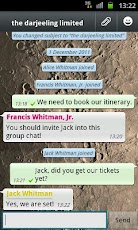
WhatsApp Messenger is a smartphone messenger available for Android, BlackBerry, iPhone, Windows Phone and Nokia phones. WhatsApp uses your 3G or WiFi (when available) to message with friends and family. Switch from SMS to WhatsApp to send and receive messages, pictures, audio notes, and video messages. First year FREE! ($0.99/year after)

WHY USE WHATSAPP:

★ NO HIDDEN COST: Once you and your friends download the application, you can use it to chat as much as you want. Send a million messages a day to your friends for free! WhatsApp uses your Internet connection: 3G/EDGE or Wi-Fi when available.

★ MULTIMEDIA: Send Video, Images, and Voice notes to your friends and contacts.

★ GROUP CHAT: Enjoy group conversations with your contacts.

★ NO INTERNATIONAL CHARGES: Just like there is no added cost to send an international email, there is no cost to send WhatsApp messages internationally. Chat with your friends all over the world as long as they have WhatsApp Messenger installed and avoid those pesky international SMS costs.

WhatsApp Messenger 2.8.6298
★ SAY NO TO PINS AND USERNAMES: Why even bother having to remember yet another PIN or username? WhatsApp works with your phone number, just like SMS would, and integrates flawlessly with your existing phone address book.

★ NO NEED TO LOG IN/OUT: No more confusion about getting logged off from another computer or device. With push notifications WhatsApp is ALWAYS ON and ALWAYS CONNECTED.

★ NO NEED TO ADD BUDDIES: Your Address Book is used to automatically connect you with your contacts. Your contacts who already have WhatsApp Messenger will be automatically displayed.

★ OFFLINE MESSAGES: Even if you miss your push notifications or turn off your phone, WhatsApp will save your messages offline until you retrieve them during the next application use.

★ AND MUCH MORE: Share location, Exchange contacts, Custom wallpaper, Custom notification sounds, Landscape mode, Precise message time stamps, Email chat history, Broadcast messages and MMS to many contacts at once and much much more!

--------------------------------------------------------- 
We’re always excited to hear from you! If you have any feedback, questions, or concerns, please email us at:


or follow us on twitter:

@WhatsApp
---------------------------------------------------------

When roaming, additional carrier data charges may apply. Please contact you carrier for details.

WhatsApp Messenger 2.8.6298


Market :
https://play.google.com/store/apps/details?id=com.whatsapp

CalenGoo 1.0.87

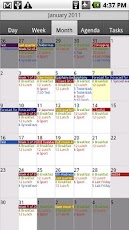
CalenGoo v1.0.87 Apk - CalenGoo is a calendar app that can sync with Android calendar and Google Calendar. It is designed to make it easier and faster to work with your calendar on your phone. Five different calendar views (day, week, month, agenda, landscape day) give you a good overview over your upcoming events. To make rescheduling events easy, they can be moved or copied via drag&drop in the day, week, month and landscape day view.

If you have any problems please contact android@calengoo.com! (Please ensure that you are using the correct email, someone in the reviews said he didn't get an answer, but I re-checked my emails and I did not get any email from him.)

Additional features:

- Drag&Drop support to move, copy, open and delete events
- Widgets to see your events on your home screen without opening the app: day widget (4x1, 4x2, 4x3), week widget (4x3, 4x4, 5x5), month widget (4x3, 4x4, 5x5) and agenda widget (different sizes from 2x1 up to 5x5). In the month 4x4 widget you can tap a single day to directly open it. The agenda widgets can be (optionally) scrollable (but under Android 2.x this requires a special home screen manager).
- Zoomable month view
- Configurable startup view (day, view, month, agenda)
- When adding recurring events you can use the same rules that you can use in Google Calendar, e.g. you can create events "on Monday and Thursday every two weeks" or "every last Friday in a month".
- Direct sync with Google Calendar option e.g. to download all historical data and to be able to assign icons to events
CalenGoo 1.0.87
$5.90

- Predefined and custom icons can be assigned when syncing directly (http://android.calengoo.com/icons )
- Improved date picker that displays a whole month to choose a date
- Search function (with optional advanced options like "Whole words" and "Case sensitive")
- Customizable hardware buttons (e.g. you can assign the "Today" function to the "back" button)
- Sync with Google Tasks
- Many configuration options to change the way the app looks and works.
- Repeatable, snooze-able reminders using a custom sound (e.g. an MP3 file from your phone) or one of the built-in sounds. You can choose a different sound for each calendar.
- The birthdays and anniversaries of your contacts can be displayed (http://android.calengoo.com/birthdays )
- Events can be sent as SMS or email. When sending them as email an ICS file is attached that the recipient can use to import the event into his own calendar.
- Functions to export/import entire calendars as ICS files.
- Completable events and floating events ( http://android.calengoo.com/completable )

CalenGoo 1.0.87

REQUIRES ANDROID:1.6 and up

Download Apk :

Market :
https://play.google.com/store/apps/details?id=com.calengoo.android

Lucky Patcher 2.6.0

Lucky Patcher 2.6.0 Apk - v2.6.0 update:

~ Orientation by sensor added.
~ Bugs fixed.
Lucky Patcher 2.6.0

v2.5.9.2:
fc to logcat report fixed
size of text fixed
bugs fixed

v2.5.9:
filter->modified applications
bugs fixed

v2.5.8:
fc to landscape orientation fixed

v2.5.7
clover-in this application patcher made changes
translation updated
minor bugs fixed

v2.5.6:
FPSe patch added
translation updated
minor bugs fixed


v2.5.5.1:
~ Black Screen fixed
~ Minor bugs fixed

v2.5.4
empty apps list fixed
minor bugs fixed

v2.5.2:
Automatic scanning odex-Application

v2.5.0:
- Bug fixed
- Root-commands Reworked(busybox fix)
- Translations updated

v2.4.9:
bug fixes;

v2.4.8.3:
~ Bugs create apk fixed.
~ Optimise start;
~ Refresh packages after minimize and resume.
~ Translations updated.

v2.4.7:
Bug fixed
warning dialog added

v2.4.6.1:
Bug fixed
Start Optimised
translation update

v2.4.6:
Bug fixed
Start Optimised
translation update

v2.4.5.2:
Bugs fixed
optimised

v2.4.4
memory leaks fixed

v2.4.1
~ Icons loading optimised;
~ Algoritm by Rebuild Apk Reworked;
~ Out of Memory Bug fixed.

v2.3.9
change permissions and activities bug fixed
change paltform key to test key
bug fixed

v2.3.7
~ Bugs Report added;
~ Bugs fixed;
~ Update translations.

v2.3.6
~ Patch by Sanx for FPSe added.
~ New pattern for Amazon AppStore added.
~ Translations updated;
~ Amazon Apps not detected – it’s not bug. LP can not identify Amazon. If Identification to Amazon Apps, device will spend too many resources.

v2.3.5
Supprot Amazon Market License Verification.

OverView:

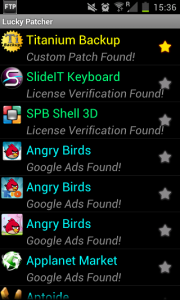
LuckyPatcher is a great tool to bypass Premium Applications License Verification.

Now it can Remove some selected application more applications will add soon.

To use this patcher you need a rooted device.

Lucky Patcher 2.6.0

Requires Android: 1.6 and up

Download Apk :

Quicker 1.9.5.2

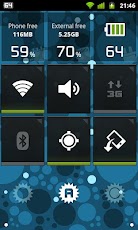
Quicker 1.9.5.2 Apk - Quicker lets you put frequently used settings and shortcuts into a single place and access them from there quickly. It extends standard stock settings with better volume and brightness controls, as well as free memory indicators. Built in screen and LED flashlight make it even more useful.

Terms of use: http://goo.gl/2dIkG

Switches:
- Brightness (w/ Screen Dimmer for convenient usage of the phone in the darkness)
- Ringer mode
- Volume streams
- Bluetooth
- Wi-Fi
- Portable Wi-Fi Hotspot*
- GPS**
- Mobile Data**
- Call settings
- Auto-sync
- Screen timeout
- Airplane mode
- Auto rotation
- Screen lock pattern

Indicators:
- Battery
- Free memory (internal, external)
- App cache
- Digital clock

Tools:
- System shortcuts
- Application shortcuts
- Flashlight (screen and LED)***

Quicker 1.9.5.2
$2.59

Others:
- Battery indicator in status bar
- Settings backup (configure once and restore at any time later)
- Quick launch via status bar shortcut or by long-pressing hardware "search" button

Quicker uses following permissions:
- "Storage" for backup / restore feature
- "GPS location" for switching GPS on/off (see **)
- "Take picture & video" for LED flashlight
- "Directly call" for the shortcut widget when you adding a direct call shortcut
- "Reading log data" for being able to report issues
- "System tools" permissions for changing various system settings
Quicker uses these permissions for the purposes listed above only.

*) Not available for some Android version and phones
**) Direct switch is available for some Android versions and phones 
***) LED flashlight might not be compatible to some phones

FAQ:
- Can Quicker launch after phone restart? Yes, just install it to the phone memory (not SD card)
- Why Brightness switch does not work? If you have a SwipePad running, then it can interfere with this function on Android 4.0 or higher devices.

NOTE 1: Although Quicker does its best to switch Mobile Data, GPS and WiFi Hotspot with a single click, there are devices / Android versions where these settings cannot be switched directly. In such cases shortcuts to stock settings are available only.

NOTE 2:
Why no direct switch? Because Android security model does not allow installed applications to change secure system parameters. This is done to protect users from malicious application that can misuse those parameters otherwise.

Quicker 1.9.5.2

REQUIRES ANDROID:2.1 and up

Download Apk :

Market :
https://play.google.com/store/apps/details?id=com.bwx.quicker

Smart Measure Pro 2.3.3

Smart Measure Pro v2.3.3 Apk - Measure the distance, height, width and area of an object with your phone.

Smart Measure Pro is the 2nd set of Smart Tools collection (distance, height, width, area).

This range-finder(telemeter) measures the Distance, Height, Width and Area of a target with your phone by trigonometry.

Are you ready to measure? Just stand up and press the shutter. The important point is aiming the camera at the GROUND, NOT the object. (i.e. In order to measure the distance from someone, aim at his shoes.)

If it is inaccurate, please read the instructions in this app or see the checklist diagram in the blog. The sensors on your phone can be changed according to OS version, firmware and battery status.
You can calibrate them with the calibrate menu and settings for yourself.

* Pro version added Features:
- Width and Area can be measured
- Quick Shutter
- Portrait mode
- Camera Zoom
- Virtual Horizon
- No ads
Smart Measure Pro 2.3.3
$0.95

* Now, 3 tools for distance were completed.
1) Smart Ruler (short, by touch) : 1-50cm 
2) Smart Measure (medium, trigonometry) : 1-50m
3) Smart Distance (long, perspective) : 10m-1km

* Do you want more tools?
Get [Smart Tools] package.

For more information, see the manual, Youtube video and the blog. Thank you.

Smart Measure Pro 2.3.3

REQUIRES ANDROID:1.6 and up

Download Apk :

Market :
https://play.google.com/store/apps/details?id=kr.aboy.measure

Thursday, October 18, 2012

Notepad Voice Recognition Pro 2.16

Notepad Voice Recognition Pro v2.16 Apk - Create your entries with voice input without the hassle of typing. Easy, fast and simple to use.

Pro features:
- Ad free
- 2 Widgets included
- Synchronise with Google Tasks
- Save lists as textfiles
- Add entries to clandar

Notepad Voice Recognition Pro 2.16
$1.29

Features:
- Voice recognition
- Check items as done
- Copy, paste, and edit entries
- Various font types and themes
- Several lists for each use
- Export and import lists
- Works with many languages
- Text to speech
- Reminder function
- Sort lists alphabetically

Supported languages:
English, Spanish, Russian, Italian, German, French, Polish and Portugese

An internet connection is needed for the voice recognition.

Notepad Voice Recognition Pro 2.16

REQUIRES ANDROID:2.1 and up

Download Apk :

Mirror :
http://www.directmirror.com/files/1ANP2XV5

Market :
https://play.google.com/store/apps/details?id=NotepadPro.DE
Related Posts Plugin for WordPress, Blogger...