Pages

Ads 468x60px

Showing posts with label Tech News. Show all posts

Sunday, November 4, 2012

Send Free SMS and Earn Free Recharge for All Mobile networks


Ultoo a initiative website in sending sms to your friends and getting paid for that. Ultoo pays 2 paise for every successful sms sent. Accumulate Rs. 10/- or above and recharge your mobile.


How to Register:
  1. CLICK HERE 
  2. Enter your details and Sign up.
  3. Starting sending sms to earn money and free recharge.
Verify your email and get Rs. 2/- in your balance.
NO SPAM.. YOU WILL BE RECHARGED FOR SURE... RK

Saturday, October 27, 2012

All the things about Windows 8


With Windows 8, launched on Friday, Microsoft wants to ensure that its new operating system runs on all form factors - desktops, notebooks and even tablets. The software giant foresees people using a common OS, seamlessly interoperating between different devices without any glitches. It also envisions hybrid gizmos that can function as a fullfledged tablet or laptop depending on the user's requirements. Of course, to create an OS that would work just as well with touchscreens as it would with the keyboard and mouse, MS has had to make some big changes to Windows. 


Logging in

Windows 8 is heavily integrated with Microsoft's web services. Users are provided with the ability to log on to their PCs with a Windows Live ID (instead of a more traditional local user account) for seamless functioning between various devices. For example, if you're following certain news feeds in the Reader app on your tablet, the same content will also be available to you on your PC. Besides you are automatically logged-on to those Metro-style apps and services that use your Live ID for authentication.

The modern UI

In one of the most radical changes to Windows in the last 28 years, MS has introduced a new tile-based user interface known as the Modern UI. First seen on Windows Phone (and called Metro UI), this interface lends itself to operations with a touchscreen.

Each app shows up as a tile on the 'Start Screen' . These app tiles are also capable of displaying dynamic updates. For example, the People app will display the latest updates from your social networks , while the News app will scroll through headlines. Even Control Panel settings and Network Connections are handled through this new interface.

Gestures

Since this OS is supposed to run on tablets, the Modern UI is designed to work with gestures such as pinching in and out, or quickly scrolling through apps with a swipe of a finger.

Desktop

There are two changes that MS made to the Desktop feature in Windows 8. First, it can now be accessed through a tile on the Modern UI. And second, the Start button is gone! (See box on how to bring it back.) Instead, users have to move the cursor to the bottom-left corner of the screen, or press the Windows key on the keyboard, to access the 'Start Screen' .

In the Desktop mode, users will be able to run all the software that they have always used in Windows. New programs will show up as a shortcut on the Start Screen.

Apps

Like the iTunes Store and the Google Play Store, Windows 8 comes with its own store where you can download and install apps. Of course, the Store will be limited to Modern apps (other programs and software will have to be procured and installed like how it's always been done).


File copy

File copy now comes with buttons to pause, resume and stop each transfer, and provides details on copy speed too.

Task manager

Microsoft says that 85% of Windows users only bring up the 'applications' and 'processes' Task Manager to check which program is using up system resources and to close those that are 'Not Responding' . So MS decided to make this easier with a revamped Task Manager that displays a simple list of the programs that are running on your PC, with a handy 'End Task' button. Of course, more details like Services, App History, Startup, etc, are available, if needed.

Refresh & restore

If a PC seemed sluggish, the old solution was to format the C drive and reinstall the OS. But Windows 8 gives users the option to go back to default settings by merely clicking the 'Refresh' option in the Settings menu. You don't lose any of your personal data in this. And in case this doesn't work, consider the Restore option,which wipes the hard drive and reinstalls Windows 8.

 Windows 8 is built on the rock-solid foundation of Windows 7 and is even more secure-with safer browsing, account protection, and parental controls.

Windows 8 system requirements

If you want to run Windows 8 on your PC, here's what it takes:
  • Processor: 1 gigahertz (GHz) or faster with support for PAE, NX, and SSE2 
  • RAM: 1 gigabyte (GB) (32-bit) or 2 GB (64-bit)
  • Hard disk space: 16 GB (32-bit) or 20 GB (64-bit)
  • Graphics card: Microsoft DirectX 9 graphics device with WDDM driver

Additional requirements to use certain features:

  • To use touch, you need a tablet or a monitor that supports multitouch 
  • To access the Windows Store and to download and run apps, you need an active Internet connection and a screen resolution of at least 1024 x 768
  • To snap apps, you need a screen resolution of at least 1366 x 768
  • Internet access (ISP fees might apply)
  • Secure boot requires firmware that supports UEFI v2.3.1 Errata B and has the Microsoft Windows Certification Authority in the UEFI signature database
  • Some games and programs might require a graphics card compatible with DirectX 10 or higher for optimal performance
  • Microsoft account required for some features
  • Watching DVDs requires separate playback software 
  • Windows Media Center license sold separately 
  • BitLocker To Go requires a USB flash drive (Windows 8 Pro only)
  • BitLocker requires either Trusted Platform Module (TPM) 1.2 or a USB flash drive (Windows 8 Pro only)
  • Client Hyper-V requires a 64-bit system with second level address translation (SLAT) capabilities and additional 2 GB of RAM (Windows 8 Pro only)
  • A TV tuner is required to play and record live TV in Windows Media Center (Windows 8 Pro Pack and Windows 8 Media Center Pack only)
  • Free Internet TV content varies by geography, some content might require additional fees (Windows 8 Pro Pack and Windows 8 Media Center Pack only)
To check if your PC meets these requirements, you can run the Upgrade Assistant.


Which Windows is right for you?


Windows RT *


Windows 8 **


Windows 8 Pro

Fluid, intuitive, and easy-to-use interface design that you can easily customize.

Check mark

Check mark

Check mark

Mail, Calendar, Messaging, Photos, SkyDrive, and other apps are built in with many more apps available at Windows Store.

Check mark

Check mark

Check mark

Includes Internet Explorer 10 for fast, intuitive browsing.

Check mark

Check mark

Check mark

Touch-enabled so you can interact with Windows in a whole new way. (Requires a PC that supports multitouch.)

Check mark

Check mark

Check mark

Mouse and keyboard–enabled so you can be as productive as you need to be.

Check mark

Check mark

Check mark

Windows Defender, Windows Firewall, and Windows Update are included, so you're up to date and more secure.

Check mark

Check mark

Check mark

Runs programs you used with previous versions of Windows. ***


Check mark

Check mark

Provides data protection to help keep your information secure. ****

Check mark


Check mark

Enables you to connect to your PC when you're on the go with Remote Desktop Connection.


Check mark

Connects to your corporate network with Domain Join.


Check mark

Comes with Office Home & Student 2013 RT Preview preinstalled so you can do more out of the box. ***** 


Check mark


Thursday, October 25, 2012

Android 4.2 Key Lime Pie will be announced on Oct 29 - Some features Leaked

On October 29, Google is all set to hold the much awaited Android event, where the software giant will reportedly unveil few Nexus devices including LG Nexus 4, Samsung Nexus 10-inch tablet along with 32GB Asus Nexus 7 and Android 4.2 OS.

Apart from these hotly anticipated launches, the Android creator is also in spotlight for the launch of the new operating system. Report are rife that the Mountain View Valley company will announce the next version of Android 4.1 Jelly Bean OS – Android 4.2.

Analysts are anticipating that Google will unveil the next Android version to compete directly with the likes of Windows Phone 8 OS, which is also confirmed by Microsoft to be officially launched on the same day, however, in a different event.

While, Android 4.1 Jelly Bean came with many new features, however, the Project Butter for a faster, smoother and more responsive performance is a notable one, similarly, Android 4.2 is also rumored to have many new features as listed below.

Though, it is not confirmed if Google will announce an incremental update to the existing Android 4.1 Jelly Bean or the next version rumored as Key Lime Pie, several reports have come up with numerous reports suggesting expected features of the new OS. Let’s take a look at them.

Project Roadrunner
Project Roadrunner is the most rumored and expected feature of Android 4.2. Project Butter in Jelly Bean made the UI transitions smoother and improved battery lifeup to a certain level, while the main objective of Project Roadrunner is to make Android platform energy efficient.
Most of the Android based handsets are bigger and employ powerful battery of over 2,000 mAh capacity, hence, making the handsets heavier and bulkier. With the Project Roadrunner feature, the manufacturers can come up with lighter handsets with smaller battery that can offer a decent backup of one day. 

Quick Settings
When it comes to Android OS, the pull down notification bar is an exclusive feature that is being adopted by other platforms as well. With the smarter quick settings feature, there will be two pull downs – one for notification bar and one for quick settings panel.
Quick settings menu will overlap your main notifications menu, giving you access to toggles for WiFi, Bluetooth, Airplane mode and more. 

Extended Security
Security is a major issue in when it comes to any device and Android developers are highly concerned on the same as the platform is quite often prone to vulnerabilities. 

In terms of security, Android 4.2 will come with three main features including SELinux, VPN Lockdown and Premium SMS conformation. According to an Android Police report, subtitled “The Super-Serious Security Edition”, a teardown of Android 4.2 has confirmed the presence of the above mentioned security features. 

The kernel add-ons makes it so that apps don’t have access to all files. You can pick from three options from SELinux: Disabled, Permissive and Enforcing to enable difference app settings for added security. 

Secondly, the code mentions VPN lockdown, which is a change from the current model that allows data to be sent over regular connection when users sign out of a VPN network. 

Finally, Android gets rid of SMS scam schemes effectively. Some apps work undercover sending paid text messages to select numbers without letting usrs know about it. However, users will have to pay hefty sums for those texts. Now, Google will simply detect whenever an app sends such a message and send a SMS confirmation to warn users. 

Multiple User Accounts
The ability to add multiple user accounts will let consumers create multiple accounts for each person who is using the device. This way, every user will have a name, photo, access to all the features including Google Play Store. However, the Play Store will have a customized app list based on the corresponding user’s list of chosen apps. Users can also create or delete user accounts as per requirement. 

Also, parental controls can be set according to specific accounts like locking Play Store purchases, downloading content based on rating and more. However, for this feature to come on Android 4.2 devices, there must be some kind of lockscreen interface and it would be nice to have features like face unlock.

New Gmail
Gmail app for Android 4.1 Jelly Bean is good, but, it lacks pinch to zoom gesture. Hence, when there is a huge image or HTML attachment along with the mail, scrolling over will be a painful task. Android 4.2 seems to have a solution for this as it is rumored to come with a native Gmail app with pinch to zoom, swipe on a conversation to either delete or archive and more to make inbox management easier. Users can also report a message as phishing, which helps Google improve security. 

Gallery
Gallery app is being redesigned to more closely resemble the photostream of Google+, bringing a more unified look to Google’s various software products.
There will be white strip down the album where it can display album name and some more information. Other than the UI alterations, entire operations would be same as before. 

Google Play Store
Google Play Store could also be updated in the new Android 4.2 to feature personalized search, promotional campaigns with notification center integration, more billing options, and easier in-app micro-transactions. 

Source: AndroidPolice

Tuesday, October 23, 2012

LG Optimus L7's price has dropped from Rs.19,990 to Rs.15,990


LG might not necessary be the most popular smartphone brand in India, but there is good news for those who are looking for a new LG smartphone. The price of the LG Optimus L7 has dropped from Rs.19,990 to Rs.15,990; effective from today. The Optimus L7 is one of the models from the latest range of smartphones released by LG last month known as the ‘L series’, the same series which the company is currently extensively marketing in India.

This device is one of the mid-ranged smartphones which comes pre-installed with Android 4.0 ICS. Other features of this device include 1GHz processor alongwith 512MB of RAM and 2.7GB of internal memory. It also sports a 4.3-inch display and a 5 megapixel camera with LED flash. Additionally, it has a 1.3 megapixel front-facing camera which enables you to make video calls. The icing on the cake is the 1700mAh battery which provides upto 19 hours of (2G) talktime, which is the best in range. It has all the connectivity features that a smartphone should have like Wi-Fi, Bluetooth 3.0, aGPS and 3G capability.
The drawback of this phone was the pricing which has now come down by 20 percent. Other disadvantages of the phone include – a laggy browser, VGA quality video recording only, single-core processor and not the best camera in the market.

LG has been trying to revamp its image and get into the smartphone market globally considering the ‘L series’ being one of the major moves by this electronics’ giant in 2012. The company also recently announced a price cut for the LG Optimus 4X HD. Further the new LG Optimus G has created a lot of buzz online and the next Nexus smartphone known as Nexus 4 will also be manufactured by LG.

Tuesday, October 16, 2012

LG Optimus G has more battery life than Samsung Galaxy S3


LG Optimus G, and Samsung Galaxy S III have the same battery capacity , 2100 mAh. But, according to the company LG, its battery has a higher density units and improved chemical composition, compared to standard solutions, which in theory allows us to achieve better results in the offline. And, as you can see from the title, this is true.

This time the device compared to other indicators, but also in the same conditions. On smartphones was set brightness 50% and batteries were charged up to 100%. As a result of the device from LG has worked 15.8 hours of talk time, and the flagship of Samsung - just 9.5 hours. As we can see, the difference is significant. In addition, tests were performed on the recording and playback of video. Optimus G worked in these modes, 3.8 and 7.9 hours, respectively, and the Galaxy S III - 2,8 and 7,3 hours. Here, the difference is smaller, but still significant.

Well, LG has really achieved its goal and improve the built-in battery in the Optimus G not in vain. Another thing is that usually when choosing a smartphone buyers pay attention to the characteristics and the manufacturer, not on the battery life. But the iron of the communicator LG is as good as a smartphone from Samsung, so maybe some people will choose Optimus G because of a great power.

Source:  koreaherald

Sunday, October 14, 2012

Smartphone Xperia S, Acro S, T / TX is getting Android 4.1 Jelly Bean update in two weeks


According to the source, who kindly provided information about upcoming smartphones Sony, smartphones Sony Xperia S, Acro S, T / TX can get an upgrade to Android 4.1 Jelly Bean in 10-15 days. Sony representatives did not comment on this information. Interestingly, the other day craftsmen from CyanogenMod have released their version of Android 4.1.1 for Xperia T.

Microsoft office will be released for iOS, Android and Symbian in March 2013


At the meeting in the Czech press conference Microsoft product manager Peter Bobek said the company will release its office application for the mobile operating system iOS, Android and Symbian in March 2013.

The press release also states that the preview version of the new Microsoft Office Mobile for a wide range of users will be available in February next year. The editors of the foreign site cnet contacted Microsoft and received the following comments: "Mobile MS Office will work on smartphones running Windows Phone, iOS and Android. Anything more we can not tell yet." OnOnlineMicrosoft, dedicated Office Mobile no, no new applications. As before, for iOS, Android and Symbian are only OneNote and Lync.

Remember that rumor that Microsoft is developing its own office for the most popular mobile operating systems go for several months, since May of this year, when the network has a leaked report about Microsoft's plans.

PS Unfortunately, a few days ago received information that the Vice-President of Microsoft Communications Frank X. Shaw called the information "inaccurate" in his Twitter. It is not clear what he meant, perhaps, the release date.

Wednesday, October 10, 2012

Samsung Galaxy S3 Mini is coming soon


Samsung has confirmed that it will unveil a smaller version of the popular Galaxy S III smartphone tomorrow.

Speaking to Korean media this morning, Samsung mobile chief JK Shin said that Samsung will lift the lid on a 4-inch version of the Android-powered smartphone on Thursday, a week after the smartphone maker sent out invitations to a launch event.

Hinting at the device's name, Shin said: "There's a lot of demand for a 4-inch screen device in Europe. Some may call it an entry-level device, but we call it 'mini'."

Shin did not reveal any additional details of the device -- such as pricing and availability -- ahead of tomorrow's launch, however. According to The Verge, the downsized Galaxy S3 will not be an entry-level device, suggesting that it will pack the very same features as its larger, 4.8-inch sibling.
According to German technology site MobileGeeks, meanwhile, the mini smartphone will have a screen resolution of 800x480 pixels, along with a rear 5-megapixel camera. It is believed that a 1GHz dual-core STE U8420 chip will power the Galaxy S3 mini and feature 16GB of flash memory with an expandable MicroSD card.

The battery is understood to be, at 1,500 mAh, a lower specification than that of the larger model, but is offset by the smaller processor and less battery-intensive display. The German technology site also claimed that the smaller Samsung smartphone will include the latest version (4.1) of Android, nicknamed Jelly Bean.

AppleInsider argues that the new Galaxy S3 mini "falls well short" of the iPhone 5, based on the specifications. The iPhone 5 boasts a resolution of 1,136x640 pixels and an 8-megapixel rear camera.
However, the Galaxy S3 mini may outshine the iPhone 5 in some areas, with rumored near-field communications (NFC) capability for contactless payments.

Samsung sold 20 million Galaxy S3 smartphone in the first 100 days after its launch, and had notched up double the sales of its Galaxy S2 predecessor after five months.

Send Free SMS using GMail in India Now

Google launches free SMS service on Gmail in India

Google has extended its free SMS chat service to Indian users. The Gmail SMS feature is now accessible to Indian users along with 51 other countries Asia, Africa and North America. Google had made this feature available to its users some African countries in 2011.

Using the free Gmail SMS service users can send text messages to mobile phones using Gmail Chat. Responses to the SMSs will appear as replies in Gmail Chat and conversations will be stored in users' Chat history, like regular chats. This feature was activated for Indian users on October 10 and is available for regular Gmail users as well as those on Google Apps.

In India the free Gmail SMS service is available on eight major mobile service operators: Aircel, Idea, Loop Mobile, MTS, Reliance, Tata DoCoMo, Tata indicom and Vodafone (Delhi, Mumbai, Kolkata, Gujarat, Andhra Pradesh, Bihar, West Bengal & Andaman and Nicobar, Assam, North East).
This feature is not yet available on the Google Talk app, also referred to as GTalk, installed on computers.

Users are initially given a credit of fifty messages and for every message sent the credit decreases by one and for each message received in response to a text message sent via Gmail Chat, the user's credit increases by five, up to a maximum of 50. When the SMS credit goes down to zero, one credit is added after 24 hours. Google has built in the credit limit to prevent misuse of its free SMS service for marketing/spamming.

Users can also 'buy' SMS credit, when they've run out of them, my sending a text message to their own phone and then by replying to that message.

People who do not wish to receive SMSs sent from Gmail Chat can block future messages from the sender by replying to the message with the word 'BLOCK' and later if they wish to continue receiving messages they can reply to the message with 'UNBLOCK'.

If Gmail Chat SMS recipients in India do not wish to receive any messages on SMS from any Gmail user, they can stop the service from sending them messages by texting 'STOP' to +918082801060. To reactivate the service they can SMS 'START' to the same number.

To send an SMS from Gmail, on the Gmail Chat interface type the phone number you want to send an SMS to and click Send SMS and then add the recipient's name and country, then click Save. Then write in the message in the chat window and press Enter.

While sending SMS from Gmail Chat to phones is free, responding to Gmail SMSs from the phone may incur standard SMS charges.

Sunday, October 7, 2012

'1 Gbps broadband speed plans for India retail users soon'


New Delhi: Retail broadband users may have access to ultra-fast download speeds of one gigabit per second plan by mid-2013 in nine Indian cities, according telecom infrastructure firm Radius Infratel.

"In the next 6-9 months, world class 1,000 Mbps or 1 Gbps (Gigabits per second) plans will be available in India to residential consumers. On connections like these, the same two hour HD movie will download in 30 seconds," Radius Infratel CEO Rajnish Wahi said.

A two-hour movie in high definition version will be about 2.2 GB (Giga Bytes) size, he added.

At average broadband speeds, the same movie takes over an hour for full download, experts said.

Whil Wahi declined to disclose the names of service providers or the cities where these plans will be first available, he said that discussions are underway and network deployment is already complete to enable this in Gurgaon.
 
He said Radius has partnered with real estate developers, including DLF, Unitech, Emaar MGF, Ansal, Mantri, Vipul, ATS, Omaxe, Vipul, M3M, Paramount and Prateek for fibre optic network that will provide high-speed broadband services in
projects being developed by them.

"Radius network is already available in or near 3 lakh homes and is live in Delhi, Gurgaon, Noida, Greater Noida, Indirapuram (Ghaziabad). The network will soon be available in Bengaluru, Chennai, Pune, Mumbai and Chandigarh," Executive
Director of Radius Infratel, Kuldeep Goyal said.

At present, Bharti Airtel and Tata Teleservices have launched 100 megabit per second plans for common users. These cost over Rs 5,000 per month.

According to reports, 1 Gbps Internet services were recently launched in Kansas City in the US.

Source : www.financialexpress.com

Sunday, September 30, 2012

Samsung Galaxy Note II available in India at Rs 39,990


Samsung Galaxy Note II can be pre-ordered on Samsung's India e-store for an advance payment of Rs 5,000. The cost of the phone would be Rs.39,990 which gives a tough competition to iPhone 5 priced at Rs 48,000.

The New smartphone-tablet hybrid , Samsung Galaxy Note II features 1.6GHz quad-core processor with 2GB of RAM, 5.5-inch Super AMOLED HD display, a 3100mAh battery and 16GB internal storage expandable up to 64 GB via microSD card.

Samsung Galaxy Note II is the company's first smartphone with Android Jelly Bean.

Keep Updated with RK World for more News , Reviews, etc about the latest gadgets. Like us on FaceBook for updates.

Sunday, August 26, 2012

Pirated Android Mobile App Sites Shut Down by Justice Department, FBI


The Justice Department sting is believed to be the first one involving pirated Android mobile apps, which is a huge, growing and profitable market for software counterfeiters.

Three Websites that allegedly sell pirated copies of Android apps have been shut down and seized by U.S. government authorities as part of ongoing efforts to battle online software piracy and counterfeiting around the world.
The seized Web domains–Applanet.net, Appbucket.net and Snappzmarket.com–all now only display a "seizure banner" from the FBI and the U.S. Department of Justice (DOJ). The banners notify visitors that the domain name has been seized by federal authorities due to copyright-infringement issues, according to an Aug. 21 DOJ statement.

“Cracking down on piracy of copyrighted works–including popular apps–is a top priority of the Criminal Division,” said Assistant U.S. Attorney General Breuer in the statement. “Software apps have become an increasingly essential part of our nation’s economy and creative culture, and the Criminal Division is committed to working with our law-enforcement partners to protect the creators of these apps and other forms of intellectual property from those who seek to steal it.”
The shutdown of the three Websites is believed to be the first such government action specifically involving Android mobile apps in an online marketplace, said the DOJ. The shutdowns were conducted with the help and coordination of Dutch and French law-enforcement agencies.

A Justice Department spokesman could not be reached for additional comment.
FBI agents downloaded thousands of copies of popular copyrighted mobile device apps from the three sites, which are "suspected of distributing copies of apps without permission from the software developers,” according to the DOJ.

The sites sold the pirated apps, and the money for the purchases was not sent to the developers who created them, as required with legitimate mobile app marketplaces.
"In most cases, the servers storing the apps sold by these alternative online markets were being hosted in other countries, and our international law-enforcement partners assisted in obtaining or seizing evidence stored on these servers," according to the Justice Department statement. "Nine search warrants were also executed in six different districts across the country today as part of the operation."

“Criminal copyright laws apply to apps for cell phones and tablets, just as they do to other software, music and writings," said U.S. Attorney Sally Quillian Yates of the Northern District of Georgia, in a statement. "These laws protect and encourage the hard work and ingenuity of software developers entering this growing and important part of our economy. We will continue to seize and shut down Websites that market pirated apps, and to pursue those responsible for criminal charges, if appropriate.”
The government has previously taken similar actions against other Websites that allegedly sell pirated or counterfeit software.

In January, the FBI shut down the Website, Megaupload.com, one of the largest file-sharing services on the Internet, on charges that it systematically abetted the widespread piracy of copyrighted music, movies, video and other intellectual property.
In a 72-page indictment in that case, the government charged seven people and two corporations, Megaupload Limited and Vestor Limited, of costing copyright holders more than $500 million in lost revenue from pirated movies and other content. The individuals face a maximum penalty of 20 years in prison on racketeering charges, five years for conspiracy to commit copyright infringement, 20 years on money-laundering charges and five years on related charges.

In December of 2011, a federal judge in Nevada ruled in favor of luxury brand Chanel and allowed the company to have about 600 different Websites shut down for selling counterfeit Chanel products.

This week’s criminal case against the Android sites included several federal agencies such as the DOJ's Task Force on Intellectual Property and its Computer Crime and Intellectual Property Section; the Office of International Affairs; the U.S. Attorney’s Office for the Northern District of Georgia; the FBI’s Atlanta Field Office; and six other U.S. Attorneys’ Offices, including the Southern District of Mississippi, the Middle District of Florida, the Western District of Michigan, the Southern District of Indiana, the District of Rhode Island and the Northern District of Texas.

Source : eweek.com

Monday, August 20, 2012

iPhone 5 Front Panel Photos Leaked


Photos that reportedly provide a glimpse of the next iPhone full front panel have leaked online.

The photos, originally uncovered by UBreakiFix and posted this weekend by MacRumors, show the rumored 4-inch screen – taller than the iPhone's current 3.5-inch size.

The new iPhone is expected to carry the same pixel density as the current device, leaving app developers with an additional few inches of screen space to fill, MacRumors said. The photos show a zoomed-in look at the top of the panel, where serials numbers and an LCD connector are located.

Apple has not officially released any details on its new smartphone, which is expected to be revealed on Sept. 12. During a July earnings call, Apple CEO Tim Cook would only say that the company has "amazing new products in our pipeline that we look forward to discussing with you in the future," but kept mum about Apple's plans for the iPhone 5.

So far, iPhone rumors have tipped the aforementioned 4-inch screen, a move that is likely necessary as more and more Android phones push the boundaries on screen size, as well as 4G LTE connectivity.

Other changes are reported to include an 8-pin dock connector, a smaller SIM card slot, possible implementation of the new Nano-SIM format, and in-cell technology that would render an extra touch-screen layer unnecessary, therefore shrinking the screen size by about half a millimeter.

According to reports, the iPhone 5 could hit stores by Sept. 21, before rolling out to more international markets in early October.

5 SMS limit upsets young texters in India


So much so, some are comparing this ban on bulk SMSes by the government to curbing their right to freedom of expression


No sooner did the news of the ban on bulk SMSes and MMSes for 15 days across the country (starting August 18) spread, than the nation, including, of course, the world of social media, was abuzz ridiculing this new decree by the government. To check the spread of rumours, which has led to exodus of NorthEastern people from certain states, the government announced this ban. 'No one will be able to send more than 5 SMSes in one go and more than 20 KB of data through mobile phones during the ban period', read the move by the Telecom Regulatory Authority of India ( TRAI), done in order to curb the spread of rumours meant to scare and create panic among the NE people in certain states. As a result, all those who must have tried sending more than five SMSes, received something which reads: 'Due to Govt. directives, More than 5 SMS per day are blocked. Please retry tomorrow. Anticipate your co-operation'.

Eid Mubarak?
What has irked most of the people is that on any festival, it is commonplace to send SMSes to greet each other, but this five SMS limitation is a cause of worry as people can't send unlimited SMSes. "Since sending greeting cards and all is passe, we normally send SMS to greet each other and on the occasion of Eid, it was annoying as I was stopped after I sent 5 of them. And since Eid is the most important festival for us, I had to call up all my friends and folks," shared Rekha Ahmed (35). For 23-year-old Misbah Khan, who stays away from her family, it was worrisome, as she says, "I could send only 5 SMSes and sadly, I received very few Eid messages from folks and friends. I was upset and though the government wants to curb the spread of rumours meant to hurt the North-East people in India, they could have eased this limitation on festivals, at least."

Online fracas
In the wake of the ban, one comment that was doing the rounds read 'Dear girls, if a guy sends u 5 messages today...Marry him immediately. He is the one.' While the hashtag '5 SMS' was trending on social networking sites, in no time, people took to the sites to voice their opinions. Check out some responses:

dorkU: 'Guys in a relationship celebrate'.
Dhincachica: 'Live bars, Clubs beyond 11:30, films on cars, smoking in pubic & now the ban on SMS beyond 5 started here. It's Ban-galore indeed.'
Panchajanya: 'After 5 SMS a day next what... 5 minute talktime per day?'
Stupidosaur: 'Limiting to 5 SMS a day would encourage determined rumour mongers to buy more SIM cards & increase the efforts needed to track them, no?

Holy SMS!
"I have this SMS pack which allows me to send unlimited SMS on a given day and with this nonsensical ban, my money has gone to waste because on calling the telecom operator, they said I won't be refunded the SMS pack money," laments Himanshu Tyagi (21). For some, banning SMS is like curbing their freedom of expression. "Nowadays, it is rare that we talk for hours over the phone and we prefer texting, but this 5 SMS limitation is like flouting our right to speech," reasons Kanika Jha (23). 26-year-old Aditi Jain, who works with an advertising firm rues, "Much of my work is done via SMS as most of my clients are based out of the city and we discuss work over SMS but it is getting difficult now because I can't be calling them every time for trivial issues also."

Some endorse the ban
There are some people who are different from the herd and happy with the 5 SMS limitation. Shekhar Saini (24) is happy. He says, "I don't have to send those 'Happy Eid' messages to people now, I find it useless and I am glad that I won't even receive those useless forwarded SMSes." Anita Khanna (26) agrees. "Though I don't send many SMSes, there are people who send me such absurd forwarded messages and now, at least for few days, I will be spared of them."

Sob, sob: GSM and CDMA users
Since the limitation is for GSM and CDMA mobile users, another joke doing the rounds reads, 'Iphone: Shit man, they have only 5 msgs a day; HTC: Ya, it's so rude; Blackberry: Now, whose your daddy'. It's starting a mobile brands war, almost, as users bandy words. "I was anti-Blackberry but today I realise the importance of owning that phone," says 23-year-old Anuj Khaitan.
 
Source : TOI

Tuesday, August 14, 2012

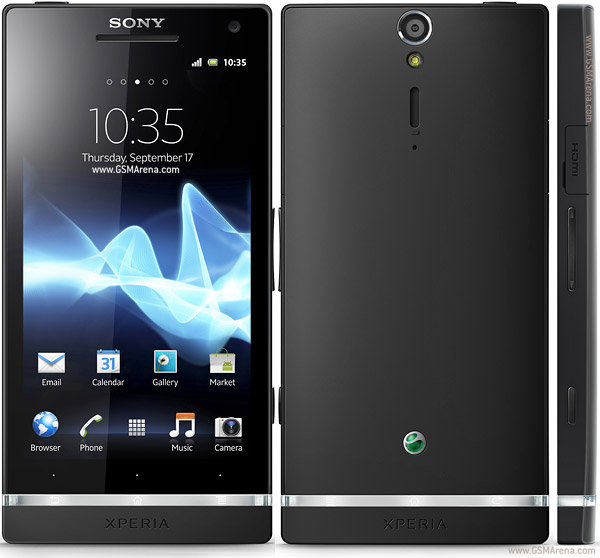
Sony Xperia S will be released in new colors


Sony has announced that soon it would be releasing a new version of the smartphone Sony Xperia S in the body dark colors serebrebristoy, which will be delivered with the same specifications as the existing devices. That is, he will be running Android 4.0 Ice Cream Sandwich, equipped with a 4.3-inch HD-display with a resolution of 1280x720 pixels, dual-core processor clocked at 1.5GHz, a camera with 12MP resolution (recording Full HD video 1080p, the sensor Sony Exmor R) , front camera with a resolution of 1.3 megapixel (HD, 720p), support for DLNA, HDMI port, and NFC-module.

The exact release date of new products has not yet announced.

Thursday, August 2, 2012

Mikogo Desktop Sharing - The Best Application for Online Meetings and Remote Support


Have you ever found yourself needing to conduct an online meeting but didn’t know what your best option was? Do you often times find yourself doing IT support for your parents from miles and miles away, only to get frustrated with their ineptitude? Mikogo is a desktop sharing and online presentation tool that is helping to facilitate the everyday business and technology needs of companies and individuals worldwide.

Conferencing

               Mikogo has a convenient and user friendly approach to desktop sharing. For starters, users can sign up for a free account that will allow them to use all of the pro features. Within that, users can edit their profile settings, schedule sessions and use advanced tools (whiteboard, record, etc.). And on the other hand, if you don’t need the advanced features you can just download the software for free to start and join desktop sharing sessions – no registrations required for that.

Desktop Sharing
               Users can share their desktops with up to 15 people (25 on a pro+ account). This can come in handy for online webinars, tutorial sessions, online teaching, IT tech support, and more. Desktop sharing features can be edited at will and include options to view, show, and view & control the desktop’s of you and your participants.
               Remote control features will also allow users to control the screen of the participants for IT or assistance purposes.

               From there you can use presentation tools like the participant pointer and pen to highlight your content and material. You can transfer files, record your desktop sharing sessions for future playback, and switch presenter and viewer modes between participants.

Mikogo Apps: iOS and Android
               Mikogo works on all 3 platforms (Windows, Mac & Linux) but what’s really nice to see is they have mobile apps:iOS and Android. Here is a statement from Mikogo released shortly after: “The core benefit of online meetings is that they allow people to participate in business meetings when unable to attend in person. In recent years there has beena growing and strong tendency towards technology ‘going mobile’ hence people want to be able to attendtheir online meetings while on the go.” (Mark Zondler, Mikogo). The app is free and can be accessed from your iphone, ipad, or Android phone/tablet.


For more information about Mikogo please visit www.mikogo.com and to download, go straight to www.mikogo.com/download.

Wednesday, August 1, 2012

Windows tips - Useful Run commands


Type the following commands in your Run Box (Windows Key + R) or Start Run

devmgmt.msc = Device Manager
msinfo32 = System Information
cleanmgr = Disk Cleanup
ntbackup = Backup or Restore Wizard (Windows Backup Utility)
mmc = Microsoft Management Console
excel = Microsoft Excel (If Installed)
msaccess = Microsoft Access (If Installed)
powerpnt = Microsoft PowerPoint (If Installed)
winword = Microsoft Word (If Installed)
frontpg = Microsoft FrontPage (If Installed)
notepad = Notepad
wordpad = WordPad
calc = Calculator
msmsgs = Windows Messenger
mspaint = Microsoft Paint
wmplayer = Windows Media Player
rstrui = System Restore
netscp6 = Netscape 6.x
netscp = Netscape 7.x
netscape = Netscape 4.x
waol = America Online
control = Opens the Control Panel
control printers = Opens the Printers Dialog

No Jelly Bean Update for 2011 xperia mobiles


Last week Sony Mobile seemed to confirm on a Facebook Q&A chat that its 2011 Xperia handsets would not be upgraded to Android 4.1 Jelly Bean. Despite some fairly specific guidance on the matter, the Sony Mobile Product Blog is now back-tracking, saying that this information was given “in error” by “a local spokeserson”.
Sony hasn’t gone as far as confirming Jelly Bean for 2011 Sony Xperia handsets but it does say that they are “actively investigating Android OS upgrades for all devices”. Note the ‘all’ in that sentence. Given the clarification we would imagine that the Jelly Bean update may be planned for at least a few handsets, otherwise why would Sony build up hopes just to dash them again? 
Interestingly, the post also talking about bringing further news on the ICS rollout for the Xperia P and other 2012 Xperia smartphones “over the next couple of weeks”. As the Xperia P has been explicitly mentioned here, this most likely points to an ICS release for the handset in the middle of August.
Here is the statement in full:
“During a Q&A session last week on our Sony Mobile GB Facebook page, a local spokesperson gave information out in error on our Android 4.1 Jelly Bean software development and rollout for 2011 Xperia smartphones.
We are actively investigating Android OS upgrades for all devices, but in the meantime, our Ice Cream Sandwich rollout for Xperia S and 2011 Xperia smartphones continues as planned.
As always, feel free to drop a question below and keep your eyes fixed on the blog, as we’ll be bringing you more on our Ice Cream Sandwich rollout for Xperia P and other 2012 Xperia smartphones over the next couple of weeks.”

Tuesday, July 31, 2012

A Complete Guide about DirectX


Ever wondered just what that enigmatic name means?


Gaming and multimedia applications are some of the most satisfying programs you can get for your PC, but getting them to run properly isn’t always as easy as it could be. First, the PC architecture was never designed as a gaming platform. Second, the wide-ranging nature of the PC means that one person’s machine can be different from another. While games consoles all contain the same hardware, PCs don’t: the massive range of difference can make gaming a headache.


To alleviate as much of the pain as possible, Microsoft needed to introduce a common standard which all games and multimedia applications could follow – a common interface between the OS and whatever hardware is installed in the PC, if you like. This common interface is DirectX, something which can be the source of much confusion.

DirectX is an interface designed to make certain programming tasks much easier, for both the game developer and the rest of us who just want to sit down and play the latest blockbuster. Before we can explain what DirectX is and how it works though, we need a little history lesson.


 DirectX history

Any game needs to perform certain tasks again and again. It needs to watch for your input from mouse, joystick or keyboard, and it needs to be able to display screen images and play sounds or music. That’s pretty much any game at the most simplistic level.

Imagine how incredibly complex this was for programmers developing on the early pre-Windows PC architecture, then. Each programmer needed to develop their own way of reading the keyboard or detecting whether a joystick was even attached, let alone being used to play the game. Specific routines were needed even to display the simplest of images on the screen or play a simple sound.

Essentially, the game programmers were talking directly to your PC’s hardware at a fundamental level. When Microsoft introduced Windows, it was imperative for the stability and success of the PC platform that things were made easier for both the developer and the player. After all, who would bother writing games for a machine when they had to reinvent the wheel every time they began work on a new game? Microsoft’s idea was simple: stop programmers talking directly to the hardware, and build a common toolkit which they could use instead. DirectX was born.


How it works..??

At the most basic level, DirectX is an interface between the hardware in your PC and Windows itself, part of the Windows API or Application Programming Interface. Let’s look at a practical example. When a game developer wants to play a sound file, it’s simply a case of using the correct library function. When the game runs, this calls the DirectX API, which in turn plays the sound file. The developer doesn’t need to know what type of sound card he’s dealing with, what it’s capable of, or how to talk to it. Microsoft has provided DirectX, and the sound card manufacturer has provided a DirectX-capable driver. He asks for the sound to be played, and it is – whichever machine it runs on.

From our point of view as gamers, DirectX also makes things incredibly easy – at least in theory. You install a new sound card in place of your old one, and it comes with a DirectX driver. Next time you play your favourite game you can still hear sounds and music, and you haven’t had to make any complex configuration changes.

Originally, DirectX began life as a simple toolkit: early hardware was limited and only the most basic graphical functions were required. As hardware and software has evolved in complexity, so has DirectX. It’s now much more than a graphical toolkit, and the term has come to encompass a massive selection of routines which deal with all sorts of hardware communication. For example, the DirectInput routines can deal with all sorts of input devices, from simple two-button mice to complex flight joysticks. Other parts include DirectSound for audio devices and DirectPlay provides a toolkit for online or multiplayer gaming.


Diagnosing problems

Diagnosing problems with a DirectX installation can be problematic, especially if you don’t know which one of the many components is causing your newly purchased game to fall over. Thankfully, Microsoft provides a useful utility called the DirectX Diagnostic Tool, although this isn’t made obvious. You won’t find this tool in the Start Menu with any version of Windows, and each tends to install it in a different place.

The easiest way to use it is to open the Start Menu’s Run dialog, type in dxdiag and then click OK. When the application first loads, it takes a few seconds to interrogate your DirectX installation and find any problems. First, the DirectX Files tab displays version information on each one of the files your installation uses. The Notes section at the bottom is worth checking, as missing or corrupted files will be flagged here.

The tabs marked Display, Sound, Music, Input and Network all relate to specific areas of DirectX, and all but the Input tab provide tools to test the correct functioning on your hardware. Finally, the More Help tab provides a useful way to start the DirectX Troubleshooter, Microsoft’s simple linear problem solving tool for many common DirectX issues.

Śιgηє ßÿ :    RK

FOR MORE GO HERE : www.geeksarea.blogspot.com 
Related Posts Plugin for WordPress, Blogger...